




Windows Path Editor
1 like
Windows Path Editor gives you a better overview and easier ways to manipulate your PATH environment settings.

Cost / License
- Free
- Open Source
Application type
Since
- Since 2018
Releases
- No releases last yearNone last year
GitHub
- GitHub stars: 317

Features
Highlights All activities
Windows Path Editor News & Activities
Recent activities
 tanao added Windows Path Editor as alternative to Envarly

Developed by
Rico HuijbersLicensing
Open Source and Free product.Written in
Alternatives
3 alternatives listedBadge
Get an embeddable badge for Windows Path EditorSupported Languages



Comments and Reviews
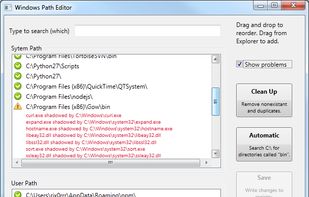
Open it and automatically see folder paths with colorful icons dividing results under System and User paths. Click "Show Conflicts/Problem" for info. (It would be good to have an explanation of what "shadowed" means.) Cleaning looks simple, powerful, yet scary. It's the kind of thing that makes you wish to see reviews first. And it's the kind of thing that makes me want to do a fresh clone backup before trying. And I will (later). Judging by the Issues area, it is still used by numbers of people. Last release 2015.