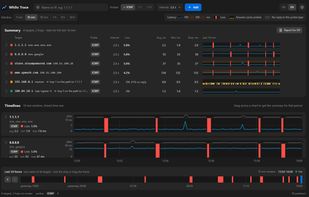
Whilo Trace watches the network path to several hosts at once and shows where packets get lost on the way. Every round sends one ICMP probe per hop, all in flight together, and keeps which hops answered and how fast.
Each hop gets a neutral status: OK; loss, when it carries on to the destination; answers some probes, when a router only limits its own replies; no reply to this probe type; or says the destination is unreachable. The app points at the hop where the loss starts, which is the part to show your ISP.
All targets and pinned hops share one timeline, from 5 minutes to 24 hours. When several paths lose packets at the same moments, the trouble is on the part of the path they share. The trace screen shows findings in plain text, a hop table and the route on a world map. Router places come from the DB-IP Lite database that comes with the app, and lookups stay on your computer.
History is kept locally in SQLite, and a report for any period can be saved as HTML, PNG, CSV or JSON. A command line tool shares the same history.
On Windows it uses the system ICMP API and needs no administrator rights. ICMP and IPv4 only for now. Tested by the author on Windows 11; the Linux and macOS packages are built automatically and have not been tried on a real machine yet.







 tensyX added Whilo Trace as alternative to WinMTR, OpenMTR, PingerPlot, Ping Tracer and 3 more


No comments or reviews, maybe you want to be first?