





Wavcut
Like
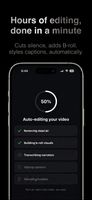
AI-powered video editor automates repetitive tasks on-device, enabling B-roll management, silence removal, styled auto-captions, and customizable presets. Offers secure, private, and rapid editing for short-form content without uploads, suitable for mobile creators.



+3


Cost / License
- Freemium (Subscription)
- Proprietary
Application type
Platforms
- iPhone

Features
Wavcut News & Activities
Highlights All activities
Recent activities
- Rupangkan updated Wavcut
 Danilo Venom added Wavcut as alternative to DaVinci Resolve, Animation Desk, Adobe Premiere Pro, CapCut and 17 more
- Danilo Venom updated Wavcut
- Rupangkan added Wavcut


Wavcut information
Developed by
 Wavcut
 Licensing
Proprietary and Freemium product.Pricing
Subscription that costs up to $20 per month + free version with limited functionality.Alternatives
21 alternatives listedBadge
Get an embeddable badge for WavcutSupported Languages


No comments or reviews, maybe you want to be first?