VX Search Alternatives

VX Search is described as 'Automated, rule-based file search solution allowing one to search files by the file type, category, file name, size, location, extension, regular expressions, text and binary patterns, creation, modification and last access dates, EXIF tags, etc' and is a File Search utility in the file management category. There are more than 50 alternatives to VX Search for a variety of platforms, including Windows, Mac, Linux, Flathub and BSD apps. The best VX Search alternative is Everything, which is free. Other great apps like VX Search are Keypirinha, FSearch, DocFetcher and Cling Fuzzy Finder.

Copy a direct link to this comment to your clipboard
VX Search alternatives page was last updated

Alternatives list

  1. Copy a direct link to this comment to your clipboard

    Search Text In Files is an easy-to-use file search application for your computer. Search through plain-text files and PDF files using simple queries and this tool will quickly list the requested files.

    Cost / License

    • Freemium (Pay once)
    • Proprietary

    Application type

    Platforms

    • Windows
     
  2.  5 likes
    Copy a direct link to this comment to your clipboard

    This tool enables users to search their NTFS formatted harddrives within seconds. It uses the MFT (master file table) of NTFS to search for files very fast.

    Cost / License

    • Free
    • Open Source

    Application type

    Platforms

    • Windows
     
  3. FileSearchEX icon
     5 likes
    Copy a direct link to this comment to your clipboard

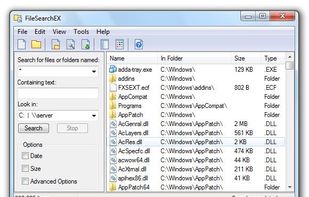
    FileSearchEX is the no nonsense file search utility for Windows 7 and higher. It offers the simplified search interface like Windows XP yet in an updated and modern fashion. Unlike other search tools, FileSearchEX works well with limited account permissions.

    Cost / License

    • Pay once
    • Proprietary

    Application type

    Platforms

    • Windows
     
  4. TaggTool icon
     6 likes
    Copy a direct link to this comment to your clipboard

    The Personal File Tagging Utility. Tagg is a utility which locates your files based on simple labels you attach or tag on to your files.

    Cost / License

    • Pay once
    • Proprietary

    Application type

    Alerts

    • Discontinued

    Platforms

    • Windows
     
  5. liquidFOLDERS icon
     4 likes
    Copy a direct link to this comment to your clipboard

    liquidFOLDERS stores all files in a separate area of your computer we call "store". A store does not have a fixed directory tree (let alone one that you'll have to manage yourself), but is one big thing.

    Cost / License

    • Paid
    • Proprietary

    Platforms

    • Windows
    • Windows Explorer
     
  6. EasyGrep icon
     2 likes
    Copy a direct link to this comment to your clipboard

    EasyGrep is an easy to use Windows grep software which allows you to search within files on your computer. Supports text based searches as well as regex searches. Supports Notepad++.

    Cost / License

    • Free Personal
    • Proprietary

    Application type

    Platforms

    • Windows
     
  7. Copy a direct link to this comment to your clipboard

    Wise JetSearch can help you search files or folders on all your local drives in just a few seconds. Input your keywords, select the drive and then start to search. After searching, Wise JetSearch will show you the searching results such as file/folder name, path, size and last...

    Cost / License

    • Free
    • Proprietary

    Application type

    Platforms

    • Windows
     
  8. Copy a direct link to this comment to your clipboard

    Search and Replace for Windows is a fast, easy to use grep utility for search and replace in multiple files, directories and archives. Supports grep style Regular Expressions. Script language for webmasters and programmers.

    Cost / License

    • Paid
    • Proprietary

    Application type

    Platforms

    • Windows
     
  9. Copy a direct link to this comment to your clipboard

    gnome-search-tool is a utility for finding files on your system. To perform a basic search, you can type a filename or a partial filename, with or without wildcards. To refine your search, you can apply additional search options.

    Cost / License

    • Free
    • Open Source

    Application type

    Platforms

    • Linux
    • GNOME
     
  10. Conjure Search icon
     12 likes
    Copy a direct link to this comment to your clipboard

    A fast, lightweight, customizable search alternative for Windows 7 that also allows for deletion and renaming. Easily locate files on mapped network drives using Conjure, expedite your searches by including folders you need and excluding ones you never use.

    Cost / License

    • Free
    • Proprietary

    Application type

    Platforms

    • Windows
     
  11. Copy a direct link to this comment to your clipboard

    Replacement for Windows built-in search. Search files, folders and other data efficiently and easily.

    Cost / License

    • Free
    • Proprietary

    Application type

    Platforms

    • Windows
     
  12. DeskRule icon
     2 likes
    Copy a direct link to this comment to your clipboard

    Wherever you have files DeskRule can locate them. Search your hard disk, but also in mobile phones and cameras, zipfolders, FTP, OneDrive and all the other virtual shell folders.

    Cost / License

    • Paid
    • Proprietary

    Application type

    Platforms

    • Windows
     
You are at page 5 of VX Search alternatives