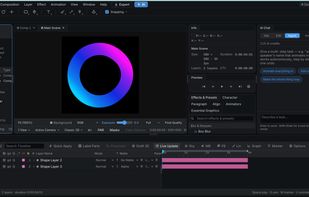
VoiceDraw is a professional web based motion graphics editor and browser alternative to Adobe After Effects that lets you create high quality animations without installing any software. It combines a modern compositing engine with an AI copilot that can understand natural language and directly edit your timeline, helping you build motion graphics faster while keeping every animation fully editable.
Unlike traditional desktop video editing software, VoiceDraw runs entirely in your browser. You can animate text, shapes, vector graphics, images, and videos using a professional timeline, real graph editor, keyframes, expressions, parenting, masking, 3D transforms, and a complete compositing workflow. Whether you are creating YouTube motion graphics, explainer videos, social media animations, UI animations, product demos, or marketing videos, VoiceDraw provides the tools needed for professional production.
The built in AI copilot goes beyond simple video generation. Instead of creating a flat video that cannot be modified, it understands your project structure and can add animations, adjust timing, create transitions, edit keyframes, modify layers, and automate repetitive motion graphics tasks while preserving a fully editable composition.
VoiceDraw is designed for motion designers, video editors, content creators, agencies, freelancers, and creative teams looking for a faster and more accessible alternative to After Effects. Since everything runs in the browser, there are no downloads, installations, or complex setup. Open a project from any computer and start animating immediately.
Key Features
- Professional browser based motion graphics editor
- Alternative to Adobe After Effects with a familiar animation workflow
- AI copilot that edits your timeline instead of generating uneditable videos
- Real graph editor for precise animation curves
- Keyframes, expressions, parenting, and animation controls
- Full compositing pipeline with layers, masks, blend modes, and effects
- 3D transforms and camera support
- Browser based workflow with no installation required
- Fast project sharing and collaboration
- Free to use with no download required
VoiceDraw brings professional motion graphics to the web, combining the power of traditional animation software with AI assisted editing to make creating high quality animations faster, simpler, and more accessible.







 ajaypanthagani added VoiceDraw as alternative to Adobe Project Violet
 ajaypanthagani added VoiceDraw as alternative to Liconcomp, Mastershot, Friction, Effect.app and 4 more


 Voicedraw Labs


No comments or reviews, maybe you want to be first?