
VIGIL Matrix Lite icon

VIGIL Matrix Lite

VIGIL Matrix is a request policy console for Chromium browsers. It shows you every third-party domain a page tried to contact, broken down by resource type (scripts, XHR/fetch, frames, images, media, fonts, stylesheets, cookies), as a single matrix you control with one click per cell.
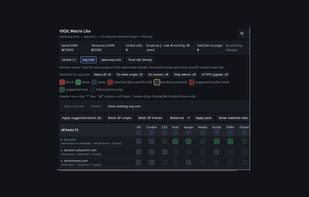
VIGIL Matrix Lite screenshot 1

Cost / License

Platforms

  • Google Chrome  [https://chromewebstore.google.com/detail/vigil-matrix-lite/iekmcklhnhlcjjdoihphhgoopiadfpng](https://chromewebstore.google.com/detail/vigil-matrix-lite/iekmcklhnhlcjjdoihphhgoopiadfpng)
  • Microsoft Edge  [https://microsoftedge.microsoft.com/addons/detail/vigil-matrix-lite/dbgiknodhcgebnijdepmhfnminfngjpb](https://microsoftedge.microsoft.com/addons/detail/vigil-matrix-lite/dbgiknodhcgebnijdepmhfnminfngjpb)
0likes
0comments
0articles

Features

No features, maybe you want to suggest one?

VIGIL Matrix Lite News & Activities

Highlights All activities

Recent activities

VIGIL Matrix Lite information

AlternativeTo Category

Security & Privacy

GitHub repository

  •  0 Stars
  •  0 Forks
  •  0 Open Issues
  •   Updated  
View on GitHub

Popular alternatives

View all
VIGIL Matrix Lite was added to AlternativeTo by malb8 on and this page was last updated .
No comments or reviews, maybe you want to be first?

What is VIGIL Matrix Lite?

VIGIL Matrix is a request policy console for Chromium browsers. It shows you every third-party domain a page tried to contact, broken down by resource type (scripts, XHR/fetch, frames, images, media, fonts, stylesheets, cookies), as a single matrix you control with one click per cell. If you've used uMatrix or NoScript and missed that kind of granular, explainable control, this is built for that.

What's new in 0.13.1:

  • Fixed: the popup matrix could show domains from unrelated sites' policies (e.g. a domain blocked on siteA showing up as a row on siteB), because the matrix builder pulled policy targets from every site you'd ever configured instead of just the current page. It now only pulls from the current page's own scope (global + this domain).
  • Added an "Only observed" toggle in the popup toolbar to filter the matrix down to domains actually seen in the current page's live scan.
  • Added a new switch, "Strip tracking params": removes known click/campaign tracking parameters (utm_*, fbclid, gclid, msclkid, etc.) from the URLs you navigate to, per scope.
  • Added a CSP hash allowlist for the "No inline scripts" switch, so specific known-good inline scripts can be allowed by content hash instead of the switch blocking all inline scripts on a site.
  • Expanded the built-in (opt-in) tracker blocklist with 3lift.com.

HOW IT WORKS Click the toolbar icon (or open the side panel) on any http(s) page. VIGIL scans the resource URLs already loaded by the active tab and builds the matrix: rows are the third-party domains it saw, columns are resource types. Click a cell to cycle allow / block / noop — it applies instantly as a temporary rule so you can reload and see the effect right away. Save to keep the policy for that site, Revert to discard the draft. A hostname hierarchy lets a rule on a subdomain override its parent domain, and a wildcard row/column handles "block this everywhere" in one click.

CAPABILITIES

  • Full policy matrix with global, domain, and exact-hostname scopes
  • Dedicated cookie column that strips Cookie / Set-Cookie headers per target
  • Per-scope switches: CSP (block inline scripts, block workers), referrer stripping, forced HTTPS upgrade
  • Three default modes: open (blocks nothing until you decide), relaxed (blocks third-party scripts/frames/XHR and strips third-party cookies, leaves first-party and passive resource types alone), hard (default-deny)
  • Optional bundled static blocklist (off by default, never fetched remotely)
  • Plain-text "My rules" editor so your whole policy is diffable
  • Matched-rules diagnostic viewer, observed-domain history, JSON import/export

