VaultSort icon
VaultSort icon

VaultSort

VaultSort organizes, cleans up and encrypts your files on your own machine - and locks them to a hardware key you can hold. Supports macOS and Windows.
VaultSort screenshot 1

Cost / License

  • Freemium (Pay once)
  • Proprietary

Application type

Platforms

  • Mac
0likes
0articles
Save

Features

Properties

Features

Highlights All activities

VaultSort News & Activities

Recent activities

VaultSort information

  • Developed by

    US flagJustin Haubrich
  • Licensing

    Proprietary and Freemium product.
  • Pricing

    One time purchase (perpetual license) that costs $24 + free version with limited functionality.
  • Alternatives

    19 alternatives listed
  • Badge

    Get an embeddable badge for VaultSort
  • Supported Languages

    • English
VaultSort was added to AlternativeTo by Paul on and this page was last updated .

No comments or reviews, maybe you want to be first?

Official Links

Page may contain affiliate links. Affiliate links never affect ranking.

What is VaultSort?

One platform. Three things your files need. Organize them. Clean them up. Protect them.

VaultSort brings powerful file organization, storage cleanup, and privacy tools together in one local-first system — so you don't need a separate app for every part of managing your files.

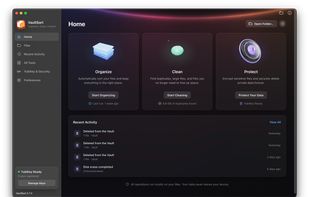
01 — Organize Organize without the busywork. VaultSort sorts files automatically, applies rules you build once, watches the folders that fill up, and uses on-device AI to help put things where they belong.

Automatic organization Boolean rule builder Folder monitoring AI-assisted categorization VaultSort rule builder with AND/OR conditions and AI category suggestions

02 — Clean Know what’s taking up your space. Find duplicates, large files, and the caches quietly eating your drive. VaultSort gives you the breakdown and the tools to act on it — so a cleanup is a decision backed by data, not a guess.

Duplicate Finder Large File Finder Visual storage breakdown Space Saver VaultSort storage breakdown showing a directory usage chart

03 — Protect Protect what matters. Keep sensitive files private with AES-256 encryption tied to hardware you hold. When a file needs to disappear for good, remove it with device-aware secure deletion.

AES-256 encryption YubiKey & Touch ID Secure deletion & Disk Shred Local-first processing

VaultSort Videos
