VaultGuard Backup is Windows backup software for people who want to know their backup actually works, not just that it ran.
It images your whole machine using the backup format built into Windows itself, so you can restore with Windows' own recovery tools even if you stop paying me. No proprietary container, no vendor holding your data hostage.
WHAT IT DOES
Whole-machine image backups on a schedule you set
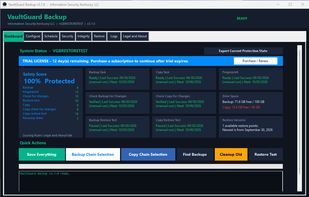
Fingerprints every backup, then checks it later to confirm nothing has changed, been corrupted, or been encrypted since
Every week, pulls about 50 real files back out of the backup and compares each to the original. You get a report that says Matched, Did not match, or Not found for every file. This is the part most backup software skips.
A Safety Score from 0 to 100 on the dashboard, built from eight things it can actually measure. It goes down on its own as a backup ages.
Checks your backups are still where you left them and looks for known ransomware file extensions before you restore
Asks Microsoft Defender to scan the machine before each backup
Keeps a second copy on another drive or in a folder your own cloud service syncs (Google Drive, OneDrive, Dropbox), and runs the same checks and restore tests on the copy
Builds a bootable recovery drive from inside the app
Restores single files without rebooting, or the whole machine through Windows recovery
Emails you when something fails, naming the task and the cause. No "success" emails.
Confirms your backup drive is encrypted and stays that way
A PIN or two-factor code guards every button that can delete or wipe anything
Technician license: up to five machines check in daily to one screen with score, last report, and task results. Export a plain-English protection report with your business name on it.
WHY IT'S DIFFERENT
Most backup tools tell you a job completed. That isn't the same as getting your data back. VaultGuard fingerprints, verifies, and restores real files every week to prove the backup is good before you need it. When something's wrong, the dashboard says so instead of staying green. And it doesn't resell storage: your backups go to hardware you own and a cloud account you already pay for.
HONEST LIMITS
Windows only. Windows 11 recommended.
The app doesn't encrypt the backup itself yet (planned for 4.0). Use BitLocker on the backup drive.
Cloud copies go through your own sync client. OneDrive won't take a single file over 250 GB.
Scheduled, not continuous.
The restore test proves files come back. A full bare-metal rehearsal is what the recovery drive is for; try it once.
Built and supported by one person in Kentucky. You talk to the person who wrote it. I'm not a 24-hour operation.
PRICING
Individual: $14.99/month or $149.99/year, one PC.
Technician: $49.99/month or $499.99/year, up to five machines.
14-day free trial, no card. If a subscription lapses, nothing is deleted and the backups are still yours.







 sukritis added VaultGuard Backup as alternative to Zmanda
 David Martin added VaultGuard Backup as alternative to Clonezilla, Rescuezilla, Macrium Reflect, Rclone and 94 more

 Information Security Kentucky

No comments or reviews, maybe you want to be first?