

VanityFilter icon
VanityFilter icon

VanityFilter

Windows app that smooths only the skin in recorded video, with per-person masks, local processing and a one-time license.
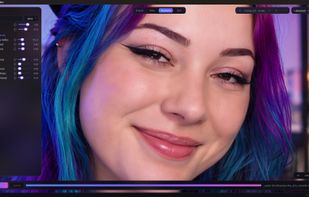
Zoomed to 200 percent to check fine skin texture before exporting. Pores and detail are kept, not wiped out.

Cost / License

  • Pay once
  • Proprietary

Application type

Platforms

  • Windows
0likes
0articles
Save

Features

Properties

  1.  Privacy focused

Features

  1.  No registration required
  2.  Non Destructive Editing
  3.  Ad-free
  4.  Live Preview
  5.  Hardware Accelerated
  6.  Works Offline
  7.  No Tracking
  8.  Support for 4K
  9.  Batch processing
  10.  Offline

VanityFilter News & Activities

Highlights All activities

Recent activities

VanityFilter information

VanityFilter was added to AlternativeTo by Erran YEARTY on and this page was last updated .

No comments or reviews, maybe you want to be first?

What is VanityFilter?

VanityFilter is a standalone Windows application for retouching skin in recorded video. It detects up to five faces per frame, including turned and profile heads, builds a separate mask for each person across face, forehead and neck, and smooths only skin. Eyes, lips, hair, glasses, clothing and the background are left as shot.

Controls cover smoothing strength, texture repair, detail restore, skin brightening, shine removal, redness reduction and blemish removal, with a master Amount dial and a live preview that matches the export. Original, Mask, Processed and Split views, with zoom to 200 percent, show exactly which pixels are treated. Five built-in presets and four user slots are included, and presets can be shared as .vfpreset files. Sessions can be saved as project files, protection around lips, eyebrows and ears is adjustable, and the preview labels which faces are selected for treatment.

It reads MP4, MOV, AVI and MKV and exports H.264 MP4 or ProRes 422 HQ MOV with the audio track included. It can also export a grayscale mask matte for use as a track matte in Premiere Pro or DaVinci Resolve, plus a settings JSON sidecar. Batch processing is available in the app and through the included command-line tool.

All processing runs on the user's PC. Footage is never uploaded, license activation works offline, and no account is required. An NVIDIA GPU can accelerate H.264 encoding but is not required.

VanityFilter Videos

Show 3 more videos
