


uBlacklist
26 likes
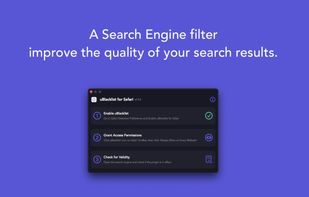
Extension filters chosen sites from search engine results with instant blocking, accepts match patterns and regular expressions, partially supports alternative search engines, enables cloud sync, and allows subscribing to public blacklists for cross-device use.

Cost / License
- Free
- Open Source (MIT)
Platforms
- Google Chrome
- Safari
- Mozilla Firefox


Features

Highlights All activities
uBlacklist News & Activities
Recent News
No news, maybe you know any news worth sharing?
Share a News Tip
Recent activities
- lilith888 liked uBlacklist
- ali-pxr liked uBlacklist
- DoreSoftware liked uBlacklist
- DeeJayLSP liked uBlacklist
- Jerry-4792 liked uBlacklist
- ralaud liked uBlacklist
- Abu Sufyan liked uBlacklist
- Myrano liked uBlacklist
 Berkay Gediz added uBlacklist as alternative to uSozluk
- AkumuKernel liked uBlacklist

Developed by
 iorate
 Licensing
Open Source (MIT) and Free product.Written in
Alternatives
7 alternatives listedBadge
Get an embeddable badge for uBlacklistSupported Languages

AlternativeTo Category
Web BrowsersApple AppStore
- Updated
- 4.04 avg rating
GitHub repository
- 6,658 Stars
- 348 Forks
- 2 Open Issues
- Updated





SAY GOODBYE TO BIG COMPANIES WITH THESE ALTERNATIVES
Throughout the years, we have been relying on big companies like Google, Microsoft, Meta and others to give us access to their products to use our computers and phones, communicate on the online web, and store our files. However, as things have gotten worse with the years and the rise of gen-AI only making things worse, people are starting to question if they can even move to new services. However, the journey can be hard and there are so many options that non-tech savvy people are going lose patience and give up.
That is why I made this long and comprehensive list of mostly open-source alternatives to different things from computer OS, social media, to even TV. Many things are easy to move to, others are for more tech-savvy people, and this list doesn't even have all of the available options in any category! However, this is a great first step into trying new things and to slowly move away from big tech. You don't need to do it all at once, go step by step, decide if there are some services you can't stop using and which ones could use a switch and have fun!
Comments and Reviews
Good browser extension to block some websites from your search results. I use it with DuckDuckGo, and it allows me to block many shady, spam, or uninteresting domains.
I look for good sites on the subject "Atheism" and religious sites are always interjecting. uBlacklist solves this problem.