
TunnelBar Connect icon

TunnelBar Connect

Manage multiple SSH tunnels from the macOS menu bar or a central window, using local, remote, or dynamic SOCKS forwarding. Profiles support Keychain credentials, server identity checks, startup, reconnection, notifications, tags, iCloud sync, and Shortcuts automation.
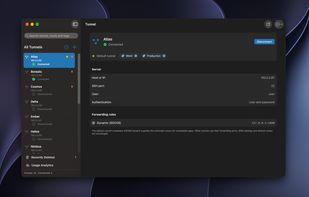
Main window with multiple SSH tunnels, connection status, tags, and forwarding rules.

Cost / License

  • Pay once
  • Proprietary

Platforms

  • Mac  Requires macOS 15 or later and an Apple Silicon Mac, plus authorized access to an SSH server that allows forwarding.
0likes
0articles
Save

Features

Features

Highlights All activities

TunnelBar Connect News & Activities

Recent activities

TunnelBar Connect information

  • Developed by

    UY flagGonzalo Piano
  • Licensing

    Proprietary and Commercial product.
  • Pricing

    One time purchase (perpetual license) that costs $4.
  • Alternatives

    36 alternatives listed
  • Badge

    Get an embeddable badge for TunnelBar Connect
  • Supported Languages

    • English
    • Spanish
    • German
    • French
    • Portuguese
    • Japanese
    • Korean
    • Chinese
TunnelBar Connect was added to AlternativeTo by Gonzalo Piano on and this page was last updated .

No comments or reviews, maybe you want to be first?

Official Links

What is TunnelBar Connect?

TunnelBar Connect is an SSH tunnel manager for macOS. It allows users to manage multiple tunnels from a central window or menu bar, and supports local, remote, and dynamic SOCKS port forwarding. It provides various authentication methods, securely stores passwords in the macOS Keychain, and verifies server identities. Users can import and export profiles, and each tunnel has individual settings for startup, reconnection, and notifications.

The software offers iCloud sync for tunnel configurations, forwarding rules, tags, and pins across multiple devices, but credentials and local usage data stay on the original device. It supports Apple Shortcuts actions to automate connections and operations, provides usage analytics, and allows tunnel recovery for up to 30 days.

TunnelBar Connect includes a default tunnel for automatic SOCKS proxy and supports both light and dark themes. It's available in nine languages and compatible with macOS 15 or later on Apple Silicon. After a 7-day free trial, users can unlock the software permanently with a one-time payment. There's no subscription or automatic charge, and existing connections can conclude normally with settings and credentials retained. The software doesn't offer hosted VPN service or modify system DNS settings.