TuckBar icon
TuckBar icon

TuckBar

 Like

Hide the macOS menu bar on only the displays you choose, so a static bar stops wearing your OLED screen. Free and open source.
TuckBar screenshot 1

Cost / License

  • Free
  • Open Source (MIT)

Since

  • New

GitHub

  • GitHub stars: 10

Platforms

  • Mac
0likes
0articles
Save

Features

Features

Highlights All activities

TuckBar News & Activities

Recent activities

TuckBar information

GitHub repository

  •  10 Stars
  •  1 Fork
  •  6 Open Issues
  •   Updated  
View on GitHub
TuckBar was added to AlternativeTo by dutch03 on and this page was last updated .

No comments or reviews, maybe you want to be first?

Official Links

What is TuckBar?

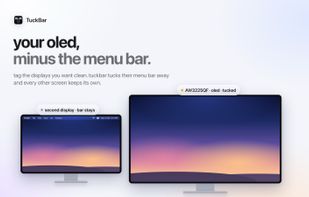
macOS can auto-hide the menu bar, but only on every display at once. TuckBar does it per display: tag your OLED, tuck its bar away, and your other monitors keep theirs. Move the pointer to the top edge and the bar comes back.

Choose how the bar is covered: your real wallpaper, captured live so the bar simply vanishes; solid black, with the pixels off; or anywhere between on a dim slider. If the tagged display is your only screen, TuckBar falls back to the native auto-hide.

It hides the whole bar; it does not organise individual menu bar icons. Free, MIT licensed, on the Mac App Store.