

TryDesk icon
TryDesk icon

TryDesk

 Like

Free, open-source remote desktop with no account: control a Windows PC from Windows, Mac, Linux or Android over encrypted P2P.
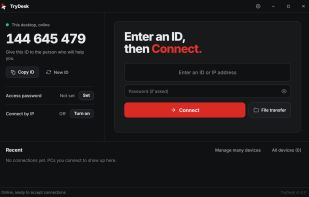
Home screen: share your ID or enter another one to connect. No account needed.

Cost / License

Since

  • New

Platforms

  • Windows  Windows 10 or 11 (64-bit). Windows 7 and 8 are not supported.
  • Mac  Controller only: use it to control a Windows PC. The Mac itself cannot be controlled.
  • Linux  Controller only (AppImage and .deb): use it to control a Windows PC.
  • Android  Controller only: use it to control a Windows PC from your phone or tablet.
  • Android Tablet  Controller only: use it to control a Windows PC from your phone or tablet.
0likes
0articles
Save

Features

Features

Highlights All activities

TryDesk News & Activities

Recent activities

No activities found.

TryDesk information

  • Developed by

    ID flagDrWeabo
  • Licensing

    Open Source (AGPL-3.0) and Free product.
  • Alternatives

    16 alternatives listed
  • Badge

    Get an embeddable badge for TryDesk
  • Supported Languages

    • English
    • Indonesian
    • Malay
    • Chinese
    • Japanese
    • Korean
    • Vietnamese
    • Thai
    • Tagalog
    • Spanish
    • Portuguese
    • Hindi
    • Russian
    • French
    • German
    • Turkish
    • Polish
    • Italian
    • Dutch
    • Ukrainian
    • Arabic

AlternativeTo Category

Remote Work & Education
TryDesk was added to AlternativeTo by DrWeabo on and this page was last updated .

No comments or reviews, maybe you want to be first?

Official Links

What is TryDesk?

TryDesk is a free, open-source remote desktop app made by an independent developer in Indonesia. There is no account and no sign-up: install it, share your ID, and connect.

Control a Windows PC from another Windows PC, a Mac, Linux or an Android phone. Connections go peer to peer and are encrypted end to end, with a relay server only when a direct path isn't possible.

Highlights:

  • No account, no login, completely free
  • Native fast path for Windows-to-Windows sessions, up to 240 FPS on capable hardware, with hardware H.264/H.265 encoding
  • System audio, file transfer and chat during a session
  • Multi-monitor support and a view of all monitors at once
  • Unattended access with an access password and an optional Windows service (works at the lock screen)
  • Privacy mode that blacks out the remote screen
  • Direct LAN connections on the same network
  • Manage many devices from one place
  • Available in 22 languages

TryDesk is licensed under AGPL-3.0 and the full source code is published at https://trydesk.ai.id/source/.

TryDesk Videos