

Transitrix Studio icon

Transitrix Studio

Transitrix Studio supports Architecture-as-Code by keeping enterprise models in structured YAML, and Diagram-as-Code by rendering diagrams from that source. This Diagram-as-Text workflow covers goals, business processes and capabilities, with sources that can be versioned in Git...
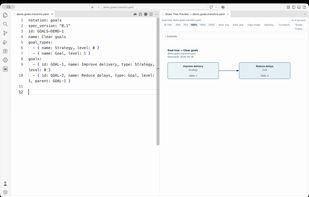
Goal model in YAML beside its preview in VS Code (Studio 3.7.3).

Cost / License

  • Free
  • Open Source (MIT)

Application type

Platforms

  • Visual Studio Code  Install from Open VSX; stock VS Code users download the VSIX and use Install from VSIX.
  • JetBrains IDE
  • Cursor
  • Windsurf
0likes
0articles
Save

Features

No features, maybe you want to suggest one?

Transitrix Studio News & Activities

Highlights All activities

Recent activities

Transitrix Studio information

AlternativeTo Category

Business & Commerce

GitHub repository

  •  13 Stars
  •  0 Forks
  •  2 Open Issues
  •   Updated  
View on GitHub

Popular alternatives

View all
Transitrix Studio was added to AlternativeTo by transitrix on and this page was last updated .

No comments or reviews, maybe you want to be first?

What is Transitrix Studio?

Transitrix Studio supports Architecture-as-Code by keeping enterprise models in structured YAML, and Diagram-as-Code by rendering diagrams from that source. This Diagram-as-Text workflow covers goals, business processes and capabilities, with sources that can be versioned in Git and reviewed in pull requests.

In VS Code-compatible editors, previews refresh on save. Supported views include goal trees, process maps, capability maps and BPMN diagrams. Model-based requirements traceability and compliance reports require the corresponding model records. A separately installed CLI validates models and compiles BPMN YAML to BPMN 2.0 XML.

For supported text-diagram workflows, Studio can be an alternative to the PlantUML extension for VS Code, with additional YAML-based enterprise models. It does not promise complete compatibility with every PlantUML diagram type or extension setting.

A separate JetBrains plugin provides read-only previews for a subset of the notations. These are snapshots that must be closed and reopened after editing; they do not include BPMN or the VS Code reporting and export features.

Studio is free and open source under the MIT license. Installation instructions cover Open VSX, manual VSIX installation for stock VS Code, and the separate JetBrains plugin. No DSM installation is required.