Track Work Time icon

Track Work Time

Android app to track your work time via WiFi or location and categorize each recorded intervall by a predefined client/task and a free text.
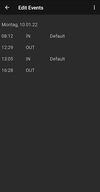
Track Work Time screenshot 1
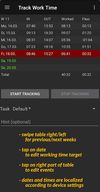
Track Work Time screenshot 2
+2
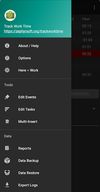
Track Work Time screenshot 3

Cost / License

Platforms

  • Android
  • F-Droid
5likes
0articles
Save

Features

No features, maybe you want to suggest one?

Highlights All activities

Track Work Time News & Activities

Recent activities

Track Work Time information

GitHub repository

  •  155 Stars
  •  33 Forks
  •  48 Open Issues
  •   Updated  (Archived)
View on GitHub

Popular alternatives

View all
Track Work Time was added to AlternativeTo by Darlene Sonalder on and this page was last updated .

No comments or reviews, maybe you want to be first?

Featured in Lists

The ultimate F-Droid setup (300+ Apps)

WHAT IS F-DROID ? F-Droid is an awesome app repository for FOSS (Free & Open Source Software) android apps. From productivity apps to games, f-droid has (almost) everything you need. Hope you will discover useful FOSS apps to free your phone from Big Tech^^ REPOSITORIES : This list includes apps from the official f-droid repo but also from IzzyOnDroid and some customs repositories which will be always linked so you can add them easily. CATEGORIES : F-Droid clients Utilities Social & Communication / 8 subcategories Health / 7 subcategories Customization / 3 subcategories Gaming / 3 subcategories Internet / 6 subcategories Productivity / 15 subcategories Privacy / 5 subcategories Security / 4 subcategories Media apps / 10 subcategories If you care about privacy check : Privacy focused OS for everyone My privacy and user friendly setup For more FOSS Android apps check : Beautiful Open Source Apps for Android DISCLAIMERS : Adding custom repo might not be as secure as the official one so I'm not responsable if you encounter any problems with them ! I encourage you to do your own research about it ! Also while open source is great for privacy and security it is not perfect. So keep that in mind before downloading any apps. Most apps that I've listed are privacy friendly but some might be not be perfectly private and secure. I again encourage you to do your own research about them. I am not a privacy and security expert. I'm also don't consider myself as a developper so I do not have any technical knowledge and so I didn't look into any source code of any apps in this list ! English is not my mother tongue ^^'
By Darlene Sonalder296 appsUpdated

What is Track Work Time?

This app can track your work time easily! You can automate time tracking using geo-fencing functions (see below). You may also categorize each recorded interval by a predefined client/task and a free text. Of course, the list of clients/tasks can be edited to suit your needs, and the app has a widget for your home screen.
Additionally, if you wish, your flexible time account is taken care of: you always see how much you worked. You can also keep an eye on how much work time is left for today or for the current week (by a notification which you can enable).

The app enables you to modify the planned working time effortlessly - just tap on the date you want to edit in the main table.

You may provide the geo-coordinates or the Wi-Fi network name of your work place and the app can automatically clock you in while you are at work. This is done without using GPS, so your battery won't be emptied by this app. (You don't have to be connected to the WiFi network at work, it just has to be visible.)

You don't want to open the app for clocking in and out? No problem - there are at least three ways to do that: add the widget to your home screen, use launcher shortcuts (long press the app icon for that) or add a new quick settings tile to your panel by tapping on the pencil below and dragging the "Track Work Time" tile up which then can toggle your clocked-in state.

If you prefer to use other apps like LlamaLab Automate or Tasker for tracking your movements, that's fine - TWT can be triggered from other apps and just do the book-keeping of your work time. In this case, you have to create broadcast intents with the action org.zephyrsoft.trackworktime.ClockIn or org.zephyrsoft.trackworktime.ClockOut. When using ClockIn, you can also set the parameters task=... and text=... in the "extra" section of the intent so your events are more meaningful. Here are some screenshots to point out how it can be done in Automate: Flow overview, "Broadcast send" block arguments. You can also use the action org.zephyrsoft.trackworktime.StatusRequest to get the current state of TWT: is the user clocked in, and if so, with which task and how much time remains for today? Here's how you can use this in Automate: Flow overview, "Send broadcast" settings top, "Send broadcast" settings bottom, "Receive broadcast" settings top, "Receive broadcast" settings bottom, "Dialog message" settings, resulting message.