Netrinos icon
Netrinos icon

Netrinos

A zero-configuration private network that lets you reach all your devices from anywhere, with no port forwarding, DDNS, or router changes.
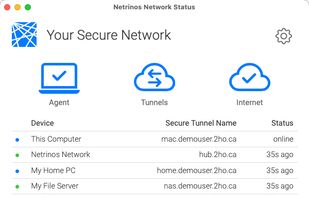
A list of all the system in your private network including their DNS names and status.

Cost / License

  • Free Personal
  • Proprietary

Platforms

  • Mac  MacOS 12 Monterey or newer
  • Windows  Windows 10 or newer
  • Linux  Debian/Ubuntu (.deb), RHEL/Fedora (.rpm), or a tarball (.tgz) for other distros.
  • Android
  • iPhone
  • iPad
  • Android Tablet
1like
1comment
0articles

Features

Properties

  1.  Privacy focused
  2.  Decentralized
  3.  Lightweight

Features

  1.  WireGuard
  2.  Split Tunneling
  3.  No Logs
  4.  No Tracking
  5.  Shared Folders
  6.  Screen Sharing
  7.  Ad-free
  8.  End-to-End Encryption
  9.  Desktop Sharing
  10.  Unattended Access
  11.  Virtual LAN
  12.  Encrypted Connection
  13.  Peer-To-Peer
  14.  Secure File Sharing
  15.  SSH Tunnel
  16.  Remote Work

Netrinos News & Activities

Highlights All activities

Recent activities

Netrinos information

  • Developed by

    CA flagBluefriday Inc.
  • Licensing

    Proprietary and Free Personal product.
  • Pricing

    Subscription that costs up to $10 per month.
  • Alternatives

    20 alternatives listed
  • Supported Languages

    • English

Our users have written 1 comments and reviews about Netrinos, and it has gotten 1 likes

Netrinos was added to AlternativeTo by Peter Carroll on and this page was last updated .

Comments and Reviews

   
Peter Carroll
0

Netrinos is as easy to use as my local area network.

Review by a new / low-activity user.

What is Netrinos?

Netrinos takes a different approach to virtual private networks. Instead of a traditional hub-and-spoke VPN, it creates a zero-configuration private network that layers a secure LAN over the public internet. Each device gets a static private IP and a simple DNS name, so you can reach it from anywhere as easily as if it were in the next room.

Because connections are outbound only, Netrinos needs no port forwarding, no DDNS, and no router changes, and it keeps working behind CGNAT (Starlink, cellular, and 5G/4G home internet) where port forwarding isn't possible. A gateway can also project devices that can't run any software, such as IP cameras, NVRs, NAS, and printers, onto your private network.

Netrinos uses WireGuard as its transport and wraps it in a zero-configuration management layer that lets WireGuard connect in ways it can't on its own. It runs on Windows, macOS, Linux, Android, and iOS, and offers both a GUI and a terminal interface.

Netrinos Videos

Show 1 more video

Official Links