





TextStow
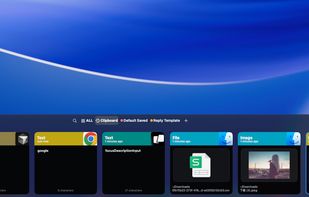
TextStow is a lightweight, native macOS menu bar utility that serves as your ultimate text workbench. It automatically records your copied content, ensuring that every snippet, image, or file is safely preserved and never forgotten.

Cost / License
- Free
- Proprietary
Application type
Platforms
- Mac


Features
TextStow News & Activities
Recent activities
- ruby-dw A comment was removed from TextStow
I like TextStow because it's a lightweight, native-first text workbench that combines clipboard history with reusable favorites, prompt templates, and built-in text cleanup. Perfect for AI workflows where I need to save and reuse copied content on the Mac.
- ruby-dw A comment was removed from TextStow
 ruby-dw added TextStow as alternative to Pesto Clipboard
 ruby-dw added TextStow as alternative to PromptClip, PastePal, Clip-It, PasteBar and 1 more
I initially downloaded TextStow just to stop losing my copied text when I accidentally hit CMD+C twice. But honestly, it has completely changed how I work on my Mac. It's not just a basic history logger; it's an actual "copy workspace" that saves me so much frustration every single day.
A few things that make this an absolute must-have for my daily workflow:
The Built-in Text Toolbox: Copying text from PDFs used to drive me crazy with all the broken lines and weird spacing. With TextStow, I...
- Mauricio B. Holguin updated TextStow
- Mauricio B. Holguin updated TextStow
- utilifyai added TextStow


Developed by
UnknownLicensing
Proprietary and Free product.Pricing
One time purchase (perpetual license).Alternatives
7 alternatives listedBadge
Get an embeddable badge for TextStowSupported Languages


Comments and Reviews
I like TextStow because it's a lightweight, native-first text workbench that combines clipboard history with reusable favorites, prompt templates, and built-in text cleanup. Perfect for AI workflows where I need to save and reuse copied content on the Mac.
I initially downloaded TextStow just to stop losing my copied text when I accidentally hit CMD+C twice. But honestly, it has completely changed how I work on my Mac. It's not just a basic history logger; it's an actual "copy workspace" that saves me so much frustration every single day.
A few things that make this an absolute must-have for my daily workflow:
The Built-in Text Toolbox: Copying text from PDFs used to drive me crazy with all the broken lines and weird spacing. With TextStow, I can instantly clean up the formatting, fix broken lines, or even format messy JSON data right before I paste it. No more pasting into a random web tool first!
Prompt Templates: I use AI tools a lot for work, and being able to save my favorite prompts with variables (like {{name}}) is incredible. I just fill in the blanks and paste—it is a huge productivity booster.
Folders & Favorites: Instead of my most-used links, email replies, and code snippets getting buried in my history, I can pin them or organize them into folders for permanent use.
100% Local Privacy: I love that everything is stored locally on my Mac. Knowing my sensitive work data or passwords aren't being synced to the cloud gives me total peace of mind.
If you are constantly copying, pasting, and tweaking text, do yourself a favor and get this. It’s super lightweight, sits quietly in the menu bar, and just works perfectly. Highly recommended!