TeXbrain icon
TeXbrain icon

TeXbrain

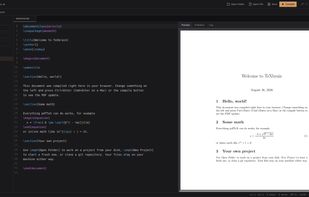
FOSS browser-based LaTeX editor with live preview, on-demand packages and git integration. No accounts, no installs, no servers.
TeXbrain screenshot 1

Cost / License

  • Free
  • Open Source (MIT)

Platforms

  • Online
0likes
0comments
0articles

Features

Properties

  1.  Privacy focused

Features

  1.  Ad-free
  2.  No Tracking
  3.  Works Offline
  4.  Dark Mode
  5. LaTeX icon  Support for LaTeX
  6.  Live Preview
  7.  Syntax Highlighting
  8.  No registration required
  9. Git icon  Git integration
  10.  LaTeX Editor
  11.  Snippets
  12.  Command palette
  13.  PDF Preview
  14.  Content Templates

TeXbrain News & Activities

Highlights All activities

Recent activities

TeXbrain information

  • Developed by

    AT flagBraian Plaku
  • Licensing

    Open Source (MIT) and Free product.
  • Written in

  • Alternatives

    50 alternatives listed
  • Supported Languages

    • English

AlternativeTo Category

Education & Reference

GitHub repository

  •  145 Stars
  •  11 Forks
  •  1 Open Issues
  •   Updated  
View on GitHub

Popular alternatives

View all
TeXbrain was added to AlternativeTo by Paul on and this page was last updated .
No comments or reviews, maybe you want to be first?

What is TeXbrain?

A free, open-source LaTeX editor that runs entirely in your browser. No accounts. No installs. No servers. Just open a tab and write.

What it does:

TeXbrain is a full LaTeX editor that compiles your .tex files to PDF directly in the browser. There is no backend. No server processing your files. Everything (the editor, the compiler, the git client) runs client-side.

You can open a local project folder, edit your files, see the PDF update, commit your changes, and push to GitHub. All from one tab.

Features:

  • LaTeX compilation in the browser. Uses a WebAssembly port of pdfTeX (SwiftLaTeX). Your .tex files are compiled to PDF without ever leaving your machine. Packages are loaded on demand and cached locally, so the first compile only downloads what your document actually uses. Recompilations take 1 to 5 seconds depending on project complexity.
  • Most of CTAN, loaded on demand. Common packages ship with the app. Anything else (memoir, abntex2, KOMA-Script, you name it) is resolved automatically from a TeX Live mirror the first time a document needs it, then cached locally for offline use.
  • Live PDF preview. Rendered with pdf.js. Multi-page, zoomable, with text selection.
  • Full git integration. Clone repos, create branches, stage files, commit, push, pull, merge. All powered by isomorphic-git running in the browser, directly on your project folder, so a terminal and TeXbrain see the same repository. No CLI needed. See Git, step by step.
  • Local file system access. Uses the File System Access API to read and write directly to your project folder on disk (Chrome/Edge).
  • Multi-file projects. File tree, tabs, drag-and-drop. Supports .tex, .bib, .sty, .cls and more.
  • CodeMirror 6 editor. Syntax highlighting, autocomplete for 70+ LaTeX commands, bracket matching, code folding, snippets, dark/light theme.
  • Command palette. Quick access to actions via keyboard shortcut.
  • Snippet picker. Math environments, document structures, Greek letters, common commands. Searchable and categorized.
  • Works offline. Once loaded, the app works without an internet connection. Compilation is local, editing is local. Packages you've compiled with before are cached; only a package you've never used needs the network once.
  • Project templates. Start from scratch or pick a template (article, thesis, beamer, report, CV, letter, minimal).

Official Links
