SoftJP TermioWin is a lightweight terminal server for Windows 10/11 that you operate from any browser. Unlike traditional terminal emulators, TermioWin runs as a local background service and serves a full terminal UI over HTTPS — accessible from Chrome, Edge, or Firefox on the same machine or any device on your LAN.
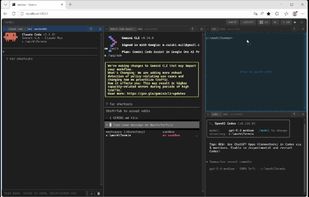
Multi-pane layout — Split the screen into multiple terminal panes, resize freely, save up to 10 named workspace layouts, and restore your entire environment in one click.
AI CLI integration — Built-in support for 14 AI coding assistants: Claude Code, Gemini CLI, OpenAI Codex, GitHub Copilot, Cursor, OpenCode, Aider, OpenClaw, Amp, Goose, Amazon Q, Qwen Code, Plandex, and Antigravity. Each tool is auto-detected and launched with an ideal working directory picker.
Prompt automation — Auto-Approval sends Enter automatically when an AI finishes responding. Prompt Flow queues multiple prompts and fires them one after another. Multi-step templates let you define reusable prompt sequences.
MCP server — Exposes terminal sessions to AI agents via the Model Context Protocol. Agents can read output, send input, wait for idle states, share a KV store, and trigger Webhook/CI pipelines.
Snapshots — Automatically commits a Git snapshot of your project folder each time you run a command, stored in a separate managed area. Roll back to any point in time without touching your existing repository.
Security — Authenticates with your Windows account (LogonUserW API). Auto-generates a self-signed TLS certificate on first run. No data leaves your machine.
Free plan available for personal use. Professional and Enterprise plans (one-time purchase) unlock MCP server, remote access, audit logs, and prompt automation.






 soft-jp-com added TermioWin as alternative to Windows Terminal, Terminator, Antigravity CLI, Google Antigravity and 2 more

 SoftJp


No comments or reviews, maybe you want to be first?