
Tellyscope icon
Tellyscope icon

Tellyscope

 1 like

Debloat your Android TV, install apps, browse and transfer files on it, all from your phone. Under 3 MB, no tracking, no root, no PC.
Tellyscope screenshot 1
Tellyscope screenshot 2
+5
Tellyscope screenshot 3

Cost / License

Platforms

  • Android
  • Obtainium
1like
0articles
Save

Features

Properties

Features

Highlights All activities

Tellyscope News & Activities

Recent activities

Tellyscope information

AlternativeTo Category

OS & Utilities

GitHub repository

  •  445 Stars
  •  23 Forks
  •  6 Open Issues
  •   Updated  
View on GitHub
Tellyscope was added to AlternativeTo by Paul on and this page was last updated .

No comments or reviews, maybe you want to be first?

What is Tellyscope?

Debloat your Android TV, install apps, and browse and transfer files on it, all from your phone. No root, no PC.

What it does:

Tellyscope talks to your Android TV, Google TV, NVIDIA Shield or Fire TV over Wi-Fi using ADB, the debugging protocol developers use. Shield and Fire TV haven't been tested on real hardware yet.

  • Connect. Finds TVs on your Wi-Fi, or add one by IP. Works with network debugging and with Android 11+ wireless debugging and its pairing code. TVs reconnect by themselves.
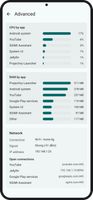
  • See how it's doing. Free space, CPU, RAM, temperature and network speed, plus what's paired or plugged in. Advanced monitor has CPU and RAM by app, processes, network and data used.
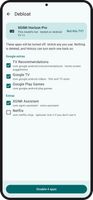
  • Debloat. Matches your TV to one of 330+ tested lists (adapted from cleanyourtv) and shows every app it will turn off before it does. Untick anything you use. No list for your model? Pick from the maker's lists, or by hand.
  • Apps. See what's running and what's on the TV. Turn off apps you don't want, turn them back on any time, and uninstall the ones you added yourself.
  • Install apps. From an APK, split APKs or an .apks/.xapk/.apkm bundle on your phone. It says first whether it's new, an update or an older version.
  • A better home screen. On TVs with the Play Store, pick a recommended launcher (Projectivy, AT4K, Dispatch or FLauncher), install it and make it Home. Switch between launchers, or back to the TV's own, from the Home screen card in Tweaks; only the TV's own is ever turned off. A launcher's accessibility service turns on only if you say yes.
  • Send files. To and from the TV's Download and Movies folders.
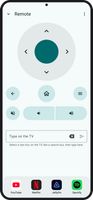
  • Remote. D-pad, Back, Home, Menu, mute and volume, typing on the TV, a dock of up to four apps, restart the TV, and Screen off for music with the picture off (Android 13 or older).
  • Tweaks. Block ads with Private DNS, faster animations, clear caches, take a screenshot.
  • Who has access. See every computer the TV allows over ADB, remove all but this phone, and answer the TV's "Allow debugging?" prompt from your phone.

Tellyscope Videos