
Techtool Lite icon
Techtool Lite icon

Techtool Lite

Run essential diagnostics, repair key macOS databases, and keep your computer’s internal drive healthy—all in a streamlined utility.
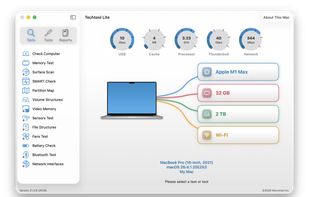
Techtool Lite screenshot 1

Cost / License

  • Free
  • Proprietary

Platforms

  • Mac
0likes
0comments
0articles

Features

  1.  No registration required
  2.  Works Offline
  3.  Ad-free
  4.  Hardware Monitoring
  5.  Battery Monitor
  6.  Hardware Diagnostics

Techtool Lite News & Activities

Highlights All activities

Recent activities

Techtool Lite information

  • Developed by

    US flagMicromat
  • Licensing

    Proprietary and Free product.
  • Alternatives

    12 alternatives listed
  • Supported Languages

    • English

AlternativeTo Categories

OS & UtilitiesSystem & HardwareNetwork & Admin

Popular alternatives

View all
Techtool Lite was added to AlternativeTo by Paul on and this page was last updated .
No comments or reviews, maybe you want to be first?

What is Techtool Lite?

Run essential diagnostics, repair key macOS databases, and keep your computer’s internal drive healthy—all in a streamlined utility.

  • Quick Mac Checks: Techtool Lite quickly verifies your Mac’s most important internals, like drives and memory.
  • Built for Simplicity: Techtool Lite removes the complexity of advanced diagnostics so anyone can keep their Mac in top shape.
  • Helpful Maintenance: Reset key system caches, rebuild important macOS databases, and view devices and active ports on your local network.

Techtool Lite, the free new utility from Micromat, puts proven Macintosh diagnostics in your hands—derived from the same trusted technology behind Techtool Pro. It quickly checks your system’s most critical components, helping you spot problems early and stay one step ahead of failure. Whether you’re maintaining your own computer or troubleshooting someone else’s, it’s a fast, dependable way to work smarter and solve issues with confidence.

  • One Click Testing: Run a predefined suite of essential diagnostics that quickly checks your Mac’s internal health. No setup required—just click and get clear, reliable results.
  • Internal Drive Testing: Check the health and structure of your Mac’s internal drive, including SMART health, partition map, and volume structures. A simple way to catch issues early and keep your system running reliably.
  • macOS Repairs & Cleanup: Use Techtool Lite to reset system caches and rebuild important macOS databases to help restore normal behavior and improve responsiveness. These tools provide a simple way to clear out outdated data and refresh core system services.
  • Battery Testing: Check the status of your Mac’s internal battery and monitor its overall condition. A simple way to stay aware of battery health over time.
  • Test Your Mac's Memory: Quickly check your Mac’s memory for potential issues. Designed for fast, repeatable testing without unnecessary complexity.
  • Network Monitoring: View devices on your local network and observe which ports they’re using. A simple way to understand network activity at a glance.
