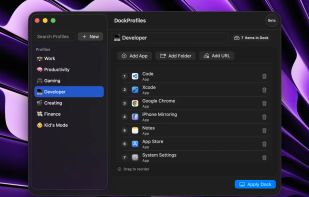
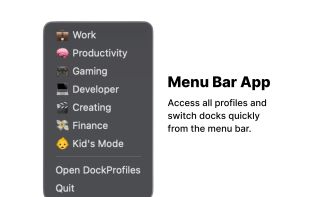
DockProfiles lets you save and switch between different macOS Dock layouts instantly. Whether you’re gaming, working, designing, or studying, one click loads the right apps, folders, and websites.


Taskbar for macOS is described as 'Windows-style taskbar for macOS which simplifies multi-tasking and working with many apps and windows as an effective Dock replacement' and is an app in the os & utilities category. There are six alternatives to Taskbar for macOS for Mac. The best Taskbar for macOS alternative is DockProfiles, which is free. Other great apps like Taskbar for macOS are Sulguni Taskbar, uBar, Sidebar and boringBar.
DockProfiles lets you save and switch between different macOS Dock layouts instantly. Whether you’re gaming, working, designing, or studying, one click loads the right apps, folders, and websites.


Windows-style taskbar replacement for macOS with pinned apps, system tray, and multi-monitor support.


uBar is the task bar for the Mac. Whether you've never really liked the Dock, always wanted the one thing that Windows does right, or are switching from Windows to OS X, uBar is the perfect solution.


Sidebar transforms the macOS Dock experience, offering multi-screen support, customizable preferences, live previews on Ventura, and window management with WindowSnap. It reserves screen space to optimize display usage and supports storing multiple window configurations for flexible setups.


The macOS Dock is built around apps, not windows. Multiple displays and desktops make it hard to track what's open where. boringBar keeps windows organized by desktop, with instant previews, one-click desktop switching, and pinned apps within reach.


The one and only taskbar for OS X. Try it out and become more productive!