

TabStick icon
TabStick icon

TabStick

Sticky notes that clip to the edge of a window instead of your desktop, each folded down to a small coloured tab until you click it.
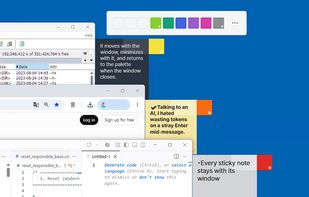
Every sticky note stays with its window

Cost / License

  • Free
  • Proprietary

Platforms

  • Windows
1like
0comments
0articles

Features

  1.  Automatic Backup
  2.  Dark Mode
  3.  Works Offline
  4.  Ad-free
  5.  No registration required
  6.  No Tracking
  7.  Portable
  8.  Sticky Notes
  9.  Desktop Application

TabStick News & Activities

Highlights All activities

Recent activities

TabStick information

  • Developed by

    KR flaglegendsteel11
  • Licensing

    Proprietary and Free product.
  • Alternatives

    3 alternatives listed
  • Supported Languages

    • English
    • Korean
TabStick was added to AlternativeTo by legendsteel11-dotcom on and this page was last updated .
No comments or reviews, maybe you want to be first?

What is TabStick?

TabStick pins a note to the window it belongs to, not to your desktop.

Click a colour in the palette, then click any window - a small coloured tab appears on that window's edge. The note itself stays folded behind it. Click the tab and the paper opens; click again and it folds away. The tab travels with its window, hides when the window is minimised, and disappears when the window closes. Nothing is left sitting on your desktop.

That colour doubles as a label. With four browser windows open, the taskbar gives you four identical icons - the tabs give you red, blue, green. Clicking a tab also brings its window to the front, so the notes end up being how you tell the windows apart.

There are nine notes, and only nine. You keep reusing them rather than accumulating hundreds: write, wipe, write again, and export the ones worth keeping. Up to three notes can share a single window.

Inside a note you get what a plain-text note should have and little else - checkboxes you tick with Ctrl+click, symbols that mark the head of every selected line, per-note text size, weight and line spacing, and six paper presets whose background and text colours you set yourself. Links and file paths open with Ctrl+click.

Everything saves as you type. A text backup is written before anything is deleted and again when the app closes, into a folder you choose. Your notes never leave your PC - the only thing the app fetches is the latest version tag, so it can tell you when an update exists.

Free, no ads. Windows 10 and 11, 64-bit. Available as an installer, a portable zip, or a light build for machines that already have the .NET 8 Desktop Runtime.
