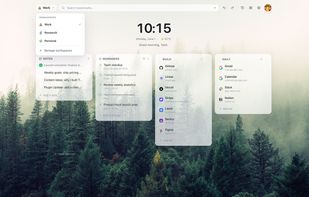
Tabisto replaces Chrome's new tab page with a calm, visual bookmark manager. Instead of a blank page or a cluttered feed, you get a dashboard with your bookmarks arranged into sections, separate workspaces for work and personal use, saved tab sessions, quick notes, and date-based reminders.
Every bookmark shows its favicon, loaded straight from the browser rather than a slow external service. The grid fills in instantly, even offline. There is no account required to use it.
Workspaces let you keep projects separate. Switch between Personal, Work, or any context you define without carrying unrelated tabs and pins along.
Saved Sessions snapshot a group of open tabs. Restore the whole set in one click.
Reminders attach a date and time to anything you need to follow up on. Quick chips for 15 minutes, 1 hour, tonight, or tomorrow keep it fast.
Quick Notes give you a scratchpad right on the new tab page.
Command Palette lets you press Cmd/Ctrl+K to jump anywhere, or / to filter bookmarks as you type.
On the design side, Tabisto offers light, dark, and auto themes, eleven accent colors, curated wallpapers and gradients, and fine-grained controls for card radius, blur, spacing, density, and glow. Pro unlocks custom wallpaper uploads, animated backgrounds, ten typefaces, unlimited bookmarks, unlimited workspaces, and session history.
Data is local-first. Your workspace lives in your browser and works offline. Cloud sync is opt-in when you sign in, free or Pro. Favicons route through the browser itself, not third-party services, and there is no link tracking.
Available for Chrome, Edge, Firefox, and Brave.
Free plan: 2 workspaces, 25 bookmarks, 1 saved session, 3 reminders, cloud sync.
Pro plan: Unlimited everything, custom wallpapers, session history, workspace export/import, priority support. Monthly at $3.99 or yearly at $2.99/month (7-day free trial included).







 Danilo Venom added Tabisto as alternative to Humble New Tab - fork
 Yash Kapoor added Tabisto as alternative to Faro, Tab Space, TabExtend, ZeroLag Tabs and 2 more
 Yash Kapoor added Tabisto as alternative to Toby For Tabs


 DevDiggers


No comments or reviews, maybe you want to be first?