
Pikamark icon
Pikamark icon

Pikamark

New tab real bookmark manager with a drag-and-drop board, workspaces, widgets & reminders and many more — no account, nothing leaves your browser.
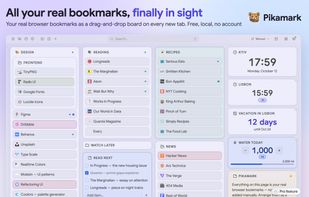
Your real browser bookmarks as a drag-and-drop board on every new tab: folders become columns, next to notes, checklists and widgets. Free, local, no account.

Cost / License

  • Freemium (Pay once or Subscription)
  • Proprietary

Application type

Platforms

  • Microsoft Edge
  • Vivaldi
  • Google Chrome
  • Opera
  • Brave
  • Mozilla Firefox
2likes
0articles
Save

Features

Properties

Features

Highlights All activities

Pikamark News & Activities

Recent activities

Pikamark information

  • Developed by

    UA flagRamapitek
  • Licensing

    Proprietary and Freemium product.
  • Pricing

    One time purchase that costs $40, and / or subscription ranging between $2 and $3 per month + free version with limited functionality.
  • Alternatives

    5 alternatives listed
  • Badge

    Get an embeddable badge for Pikamark
  • Supported Languages

    • English
    • Ukrainian
    • French
    • German
    • Spanish

Our users have written 1 comments and reviews about Pikamark, and it has gotten 2 likes

Pikamark was added to AlternativeTo by Roman Kolisnyk on and this page was last updated .

Comments and Reviews

   
Top Positive Comment
Juliie-Kolis
0

Beautiful and featured bookmark manager! Easy to use, hard to abandon, once you set everything up

What is Pikamark?

Pikamark turns your browser’s new tab page into a home for the bookmarks you already have. There is no import and nothing to rebuild in someone else’s app. It works directly on your real bookmark tree, so your bookmarks keep syncing through your browser account. If you ever uninstall it, every bookmark stays exactly where it was.

SEE EVERYTHING Your folders become a board of resizable columns that you rearrange by drag and drop. Or open any folder as a gallery of tiles or a compact list. Press 'F' for a command palette that jumps to any bookmark, runs actions and opens folders. The toolbar popup lets you search your bookmarks or save the current page without opening a tab.

REMEMBER WHY YOU SAVED IT Notes and checklists sit right next to your links. Star favorites, color-label folders and notes, and add tags, comments and due-date reminders to any bookmark, folder or note. Save every open tab as a folder, or as a named session to reopen later. Keep Work, Personal or a side project in its own workspace, each with its own look, over the same shared bookmarks.

MAKE IT YOURS Light, dark and pitch-black themes, accent colors, three typefaces, and backgrounds (presets, your own photo, solid colors or gradients). Widgets sit on the board among your folders: date and time, time zones, countdowns, a Pomodoro timer, goal counters and one-click text snippets.

FREE CORE, PRIVATE BY DESIGN No account, no ads, no analytics, no tracking. Your bookmarks, notes and tags never leave your device. The only network call is the optional Pro license check. The free version has no bookmark cap and includes the board, gallery, notes, search, favorites, color labels, themes, trash and backup/restore. Pro is optional and adds tags, comments and reminders, workspaces, tab sessions, pinned links, widgets, backgrounds, bulk rename and automatic backups. You can try all of it free for 14 days, no card needed. Anyone who installed before Pro existed keeps it for free.

Also: undo on every delete, a 7-day trash, multi-select with bulk actions, keyboard shortcuts for everything, accessibility checked with axe-core, and a UI in English, Ukrainian, Spanish, French and German. Desktop browsers only.

Works in Chrome, Edge, Firefox, Brave, Opera and Vivaldi.

Pikamark Videos
