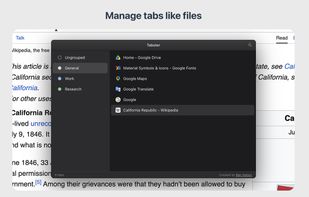
If you usually have dozens of tabs open across several groups, Tabster gives you a quick, keyboard-friendly way to find and organize them without leaving the page you're on. Press Cmd/Ctrl+E and a Finder/File Explorer-style overlay opens over your current tab.
A familiar two-pane layout
Your groups live in the sidebar, and the tabs inside the selected group fill the main list. Click to select, double-click to jump, right-click for everything else.
Find any tab fast
Press Cmd/Ctrl+F and start typing. Search filters your tabs as you go, so you're not hunting through a crowded tab strip.
Organize by dragging
Drag tabs between groups to rearrange your workspace, one at a time or several at once. You can also use keyboard shortcuts to cut, copy and paste – just like moving files.
Name your groups
Give groups names like "Work," "Research," or "Shopping". The names stick for as long as they're open.
Free up memory by unloading tabs
Unload tabs or groups you're not using to reclaim memory, and load them back when you need them again. Helpful when a session gets heavy.
Fits right in
Tabster automatically follows your light or dark theme, so it looks at home next to the rest of your browser.
Built for the keyboard
- Cmd/Ctrl+E — Toggle Tabster
- Cmd/Ctrl+F — Search tabs
- Cmd/Ctrl+A — Select all
- Cmd/Ctrl+C / X / V — Copy / cut / paste tabs
- Cmd/Ctrl+U — Unload tabs
- Shift + Cmd/Ctrl+U — Load tabs
- Cmd/Ctrl+G — Group tabs
- Up / Down Arrows — Navigate (Shift to extend selection)
- Enter — Jump to tab
- Backspace — Close tabs
- Esc — Step back or close
You can also select ranges of tabs, then close, move, or unload them all at once.
Your data stays yours
Tabster doesn't collect your browsing data or send it anywhere. Everything stays on your device.







 grizzlyb added Tabster as alternative to Tabsets Tab Manager, OneTab, Tab Session Manager, Sidebery and 32 more


No comments or reviews, maybe you want to be first?