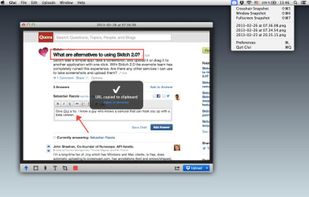
Right click on any web page, frame or iframe, click "Save Page As Image..." and then resize the selection around the piece you want to save.
Cost / License
- Free
- Open Source
Application type
Alerts
- Discontinued
Platforms
- Mac
- Windows
- Linux
- Firefox


Szoter is described as 'Is easy to use, free, online image annotation tool. It makes expressing Your ideas and thoughts easy. It can be used to share Your ideas with friends, highlight important parts of images or even to create readable bug reports' and is an website in the photos & graphics category. There are more than 50 alternatives to Szoter, not only websites but also apps for a variety of platforms, including Windows, Mac, Linux and iPhone apps. The best Szoter alternative is ShareX, which is both free and Open Source. Other great sites and apps similar to Szoter are Flameshot, Greenshot, PicPick and Snipping Tool.
Right click on any web page, frame or iframe, click "Save Page As Image..." and then resize the selection around the piece you want to save.


Simple, but powerful application for taking screenshots, editing them with included editor, and saving using multiple options, such as local storage, cloud, FTP-server, or direct copying to the clipboard or E-mail message.


The smallest free tool for taking screenshots of different size. Just open SnapaShot, resize it's window to fit the area you want to save, and press "save it" button.


Ybex Clipboard is an easy to use tool and a free web service to capture, annotate and share your screen, texts and images.

Annotable is a feature-packed image annotation app that makes it easy to annotate screenshots, pictures and more on mobile.


SnipZero is a convenient zero-install screenshot app that lets you take screenshots right from your web browser. No installation required. You can select any application window or browser tab as source.


TechSmith Capture provides a simple, free way to create basic screenshots and screen recordings and share them with others.


EasySnap - MultiOS application to take screenshots or record video. Allows to edit screenshot before upload or save it.

Katana is a simple, open-source screenshot utility for macOS that lives in your menubar.

Lightning fast and ultra elegant screenshot and annotation tool that does all you need without the bloat. Made for Mac and Windows.


Point Blur lets you easily add beautiful blue effects to your photos, in whole or by tracing the parts you want blurred.


Pixtick, an online application, can capture screenshot from browser. No download or installation required. Its having robust annotation tools to annotate and edit screenshots and images from hard drive or from web.