
SystemUpdater icon
SystemUpdater icon

SystemUpdater

 Like

A zero-dependency CLI updater for Linux and macOS packages, Flatpaks, containers, and dev tools with Btrfs snapshot support.
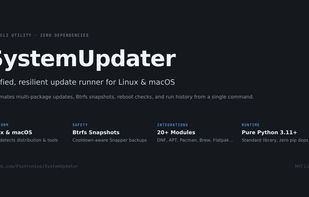
SystemUpdater overview and key architectural features

Cost / License

  • Free
  • Open Source (MIT)

Application type

Since

  • New

Updated

  • Updated Nov 2026

Platforms

  • Mac  Requires Python 3.11+
  • Linux  Requires Python 3.11+
  • Homebrew  Install via Homebrew: "brew tap Piotrunius/tap && brew trust Piotrunius/tap && brew install systemupdater"
0likes
0articles
Save

Features

Properties

Features

Highlights All activities

SystemUpdater News & Activities

Recent activities

SystemUpdater information

AlternativeTo Category

Development

GitHub repository

  •  12 Stars
  •  0 Forks
  •  0 Open Issues
  •   Updated  
View on GitHub

Popular alternatives

View all
SystemUpdater was added to AlternativeTo by Piotrunius on and this page was last updated .

No comments or reviews, maybe you want to be first?

What is SystemUpdater?

SystemUpdater (sysupdate) brings all your Linux and macOS update routines into a single, clean terminal command. Instead of manually running separate commands for your system package manager, Flatpaks, containers, dev toolchains, and editor plugins, sysupdate auto-detects what is actually installed on your machine and runs only the relevant modules.

Written strictly in the Python 3.11+ standard library, it has zero external dependencies, no pip packages, no virtual environments, and no heavy pre-compiled binaries to manage.

Why use SystemUpdater:

  • Smart Auto-Detection: It inspects your operating system (/etc/os-release or macOS version) and installed software. If a tool or package manager isn't installed, it simply steps aside without throwing errors.
  • Snapper Btrfs Integration: If Snapper is configured on your machine, sysupdate can automatically trigger a protective snapshot right before touching system packages. A configurable cooldown timer prevents snapshot spam if you run updates multiple times a day.
  • Know Exactly Why a Reboot Is Needed: Instead of showing a generic "reboot required" flag, the final summary highlights the specific updated components that triggered the restart requirement (such as kernel, systemd, firmware, or microcode).
  • Private Run History & Log Redaction: Automatically stores your last 30 runs locally (sysupdate --history / --show-log) while scrubbing tokens, credentials, and passwords from captured command outputs so you can safely audit yesterday's failed runs.
  • Targeted Updates: Update everything at once, or focus only on what you need using --only, --skip, or categories like --category dev, system, containers, or gaming.
  • Extensive Module Support: Covers system packages (APT, DNF/DNF5, Pacman/AUR, Zypper, APK, XBPS, macOS Software Update), Flatpaks, Homebrew, Docker/Podman containers, dev runtimes (Rustup, Node/npm/pnpm/bun, Python tools, Ruby, SDKMAN, mise, asdf), gaming tools (ProtonPlus, Gear Lever), dotfiles (Chezmoi, Yadm), and editor plugins.
  • Quality of Life: Generates native shell completions for Bash, Zsh, and Fish (--generate-completion), sends desktop notifications upon completion (--notify), and lets you plug in custom pre/post shell commands via a simple TOML configuration.