





SyncUp (Syncthing)
4 likes
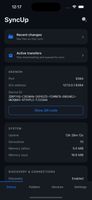
Syncthing's official Android client was archived in December 2024. No single client ran on both phones from one codebase, so I built this. The daemon runs in-process via gomobile, with a React Native UI scaffolded from react-native-go.



+2


Cost / License
- Free
- Open Source (MPL-2.0)
Application type
Since
- Since 2026
Releases
- 17 releases last year17 last year
GitHub
- GitHub stars: 249

Features
Highlights All activities
SyncUp (Syncthing) News & Activities
Recent activities
I fell in love with the design and the user interface and was devastated to find out that I could only use the pre-generated folders for syncing on devices that aren't the primary host. If I could define the folder that secondary devices sync to, it would be an instant 5 stars.
 Paul added SyncUp (Syncthing) as alternative to Iris Drive
 Alexander Menzel added SyncUp (Syncthing) as alternative to Syncative
- eslam900999 liked SyncUp (Syncthing)
 Paul added SyncUp (Syncthing) as alternative to DeltaSync
- ByteProphet liked SyncUp (Syncthing)
- Xprt25 liked SyncUp (Syncthing)
- niksavc liked SyncUp (Syncthing)
- Darlene Sonalder added SyncUp (Syncthing)
 Darlene Sonalder added SyncUp (Syncthing) as alternative to Syncthing-Fork, Syncthing Lite, Synctrain, BasicSync and 2 more


Developed by
 Siddarth Kumar
Licensing
Open Source (MPL-2.0) and Free product.Written in
Alternatives
9 alternatives listedBadge
Get an embeddable badge for SyncUp (Syncthing)Supported Languages

AlternativeTo Category
Backup & SyncGitHub repository
- 249 Stars
- 9 Forks
- 20 Open Issues
- Updated


Comments and Reviews
I fell in love with the design and the user interface and was devastated to find out that I could only use the pre-generated folders for syncing on devices that aren't the primary host. If I could define the folder that secondary devices sync to, it would be an instant 5 stars.