
Switchover Snip icon

Switchover Snip

Switchover Snip is the Windows Snipping Tool rebuilt for the Mac, for people who keep reaching for Win+Shift+S out of habit.
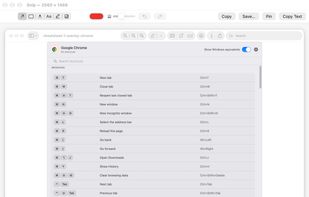
The editor a capture opens into: arrows, rectangles, pen, highlighter, text labels and a pixelate tool.

Cost / License

  • Free
  • Proprietary

Application type

Platforms

  • Mac  Requires macOS 14.0 or later. Apple silicon and Intel.
0likes
0articles
Save

Features

Properties

Features

Highlights All activities

Switchover Snip News & Activities

Recent activities

Switchover Snip information

AlternativeTo Categories

Office & Productivity, Photos & Graphics
Switchover Snip was added to AlternativeTo by thanujan on and this page was last updated .

No comments or reviews, maybe you want to be first?

Official Links

What is Switchover Snip?

Switchover Snip is the Windows Snipping Tool rebuilt for the Mac, for people who keep reaching for Win+Shift+S out of habit.

Snip a region, a single window or the whole screen, and the capture opens straight into an editor. Mark it up with arrows, rectangles, a freehand pen, a highlighter, text labels and a pixelate tool for blurring out anything private.

Any capture can be pinned to the screen as a small floating window that stays on top, so a reference stays visible while you work in another app. "Copy Text" reads the words in a capture using on-device text recognition and puts just the text on the clipboard, no picture. Captures can be saved, copied or dragged straight into another app, and the shortcut can be remapped.

It has no network entitlement at all and collects nothing. Captures stay on your Mac unless you save or share them, and the text recognition happens entirely on-device. Native Swift and SwiftUI, sandboxed, distributed through the Mac App Store.

Switchover Snip Videos
