





Switchbar
4 likes
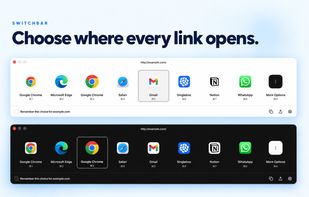
Switchbar helps you choose where every link opens. Pick a browser, browser profile, email client, or desktop app when you click a link, or set up rules to make the choice automatically.

Cost / License
- Free
- Proprietary
Application typeApplication types
Platforms
- Mac
- Windows


Features
Highlights All activities
Switchbar News & Activities
Recent activities
- Khang Do updated Switchbar
- hotfixer669 liked Switchbar
Reliable and easy to use... but it is an Electron webapp, not a native app, and while it detects alternative niche browsers like Zen and DuckDuckGo, the browser it supports are hardcoded and you can't add a custom browser if yours aren't supported. You rely on asking the devs to support it.
Icons are also nice and high resolution, but it is also hardcoded. Zen browser was stuck with older logo for a long while until the devs realize it got updated.
 livrasand added Switchbar as alternative to Browseraptor
 Devendra Pratap Singh added Switchbar as alternative to Default Tamer
 Paul added Switchbar as alternative to Switchyard


Developed by
 WebCatalog Ltd
 Licensing
Proprietary and Free product.Pricing
One time purchase (perpetual license) that costs up to $20.Alternatives
40 alternatives listedBadge
Get an embeddable badge for SwitchbarSupported Languages


Comments and Reviews
Reliable and easy to use... but it is an Electron webapp, not a native app, and while it detects alternative niche browsers like Zen and DuckDuckGo, the browser it supports are hardcoded and you can't add a custom browser if yours aren't supported. You rely on asking the devs to support it.
Icons are also nice and high resolution, but it is also hardcoded. Zen browser was stuck with older logo for a long while until the devs realize it got updated.
Note that Switchbar, Hurl, and BrowserSelect are meant to choose browsers for links that are outside of a browser.. like in a pdf or email.
Tested this for about 1-2 minutes and found I hit the capabilities of the free/basic version right away. It's too limited to be considered "basic" in my opinion, more of a demo, to get you to pay $20 to upgrade. But seeing as how the basic version stopped me in my tracks in less than a few minutes, I would rather check out some more alternatives, like 'Hurl', which is an open source alternative.
It has potential though, the Chrome extension to switch links is useful, potentially doing what another program/extension does means one less program/app to load, but Hurl does it better, in which you can switch the current tab that's open. I did not properly test out the rules and other features, but the option to open certain domains seems useful. It also looks more polished, but of course when you're charging people, you have the resources.
On the other hand $20 for a life time of this software is not too bad.