
SQLPro for SQLite icon

SQLPro for SQLite

 7 likes

Native SQLite database editor for Mac, Windows, iPhone, iPad and Android: browse and edit tables, run queries with autocomplete, and export data.
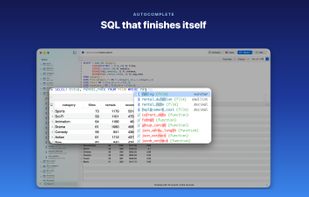
SQL editor with column autocomplete and query results

Cost / License

  • Freemium
  • Proprietary

Application type

Since

  • Since 2013 (updated Nov 2026)

Platforms

  • Windows
  • Mac
  • Android
  • iPhone
  • iPad
7likes
0articles
Save

Features

Properties

Features

Highlights All activities

SQLPro for SQLite News & Activities

Recent activities

SQLPro for SQLite information

AlternativeTo Category

Development

Apple AppStore

  •   Updated 
  •   3 avg rating
View in AppStore
SQLPro for SQLite was added to AlternativeTo by zenox on and this page was last updated .

No comments or reviews, maybe you want to be first?

Official Links

Install from the command line

  • brew install --cask sqlpro-for-sqlite

Be careful what you paste into a terminal. Check what a command installs before running it.

What is SQLPro for SQLite?

SQLPro for SQLite (formerly SQLite Professional) is a native SQLite database editor for macOS, Windows, iPhone, iPad and Android. It is for developers and analysts who work with SQLite database files, including app databases and Core Data stores.

Features (Mac):

  • SQL editor with syntax highlighting and autocomplete
  • Run several queries at once and see each result set
  • Browse and edit table data; inline filters and column reordering
  • Detects changes made to a database outside the app and reloads it
  • macOS Versions integration: roll a database back to an earlier saved state
  • Runtime loadable extensions
  • Export to CSV, JSON, XML and MySQL
  • Backwards compatibility with SQLite 2

On iPhone and iPad: autocomplete, syntax highlighting with themes, tabs on iPad, a database tree with tables, views, columns and indexes, query history, and several queries at once. On Windows: write SQL with autocomplete, browse and edit data, and design tables, indexes and triggers visually.

Free to download; a Premium upgrade is needed to work with result sets.