

Spotifast icon
Spotifast icon

Spotifast

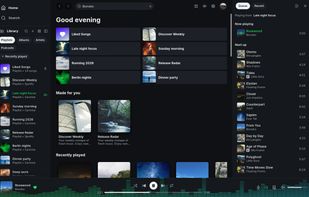
Spotify, native and fast. One lightweight Rust app for your whole library, local playback, and Spotify Connect on Linux, macOS, and Windows.
Spotifast screenshot 1

Cost / License

  • Free
  • Open Source (MIT)

Application type

Platforms

  • Mac
  • Windows
  • Linux
  • Homebrew
  • Nix Package Manager
  • Flatpak
  • AppImage
  • Arch Linux
2likes
0articles
Save

Features

Properties

  1.  Lightweight
  2.  Support for Themes

Features

  1.  Dark Mode
  2.  Support for Keyboard Shortcuts
  3.  Visualize Music
  4.  Winamp-like
  5.  Integrated Search

Spotifast News & Activities

Highlights All activities

Recent activities

Spotifast information

AlternativeTo Category

Audio & Music

GitHub repository

  •  5,270 Stars
  •  244 Forks
  •  53 Open Issues
  •   Updated  
View on GitHub

Popular alternatives

View all
Spotifast was added to AlternativeTo by Paul on and this page was last updated .

No comments or reviews, maybe you want to be first?

Official Links

What is Spotifast?

Spotify, native and fast. Spotifast is a Spotify client written in Rust with egui. It plays music through librespot, typically uses 100–250 MB of RAM, starts in well under a second, and has no browser engine. It runs on Linux, macOS, and Windows.

Playback needs Spotify Premium. Free accounts can browse and search, but cannot play music through Spotifast.

  • Lightweight: Opens in well under a second and typically uses just 100–250 MB of memory.
  • Spotify Connect: Listen on your computer with smooth transitions between songs, or control music on a speaker, phone, or TV. Playback needs Spotify Premium.
  • Library and search: Browse playlists, Liked Songs, albums, artists, and podcasts. Search the catalogue and edit playlists you own.
  • Themes: Choose light, dark, or your own colours. On Omarchy, Spotifast can follow your desktop theme as it changes, while the music keeps playing.
  • Winamp mini player: Bring back the classic Winamp look, with skins, a playlist, sound controls, and animations that move to your music.
  • MilkDrop: Watch colourful animations react to your music in their own window or full screen. Choose from more than 10,000 designs.
  • Desktop controls: Use keyboard shortcuts and your keyboard’s media keys. Keep the music playing after you close the window.
  • Open source: Free to use, study, and improve. Explore the code, report a problem, or help build the next version.