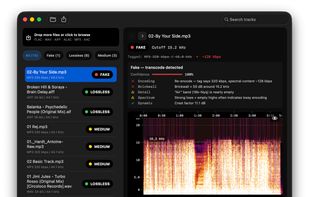
Spectro is a native macOS application that detects fake lossless audio files in DJ
libraries and music collections. It analyzes WAV, FLAC, AAC, ALAC, AIFF, and MP3 files using
spectral frequency analysis and returns an automatic verdict for each file: LOSSLESS,
FAKE, or MEDIUM.
A fake lossless file is a WAV or FLAC that was transcoded from an MP3 or other lossy
source, it takes up lossless file space but sounds no better than the compressed
original. Spectro identifies these files by detecting the spectral cutoff patterns
that lossy encoders leave behind, and shows the spectrogram so you can verify the
result yourself.
Key features:
Automatic LOSSLESS / FAKE / MEDIUM verdict per file
Batch scanning — drag a folder and scan hundreds of tracks at once
Visual spectrogram with the frequency cutoff clearly visible
Finder tags mark risky files so they appear in your normal workflow
Fully offline — audio never leaves your Mac
Import Rekordbox Library — Load your full Rekordbox collection by importing the rekordbox.xml file. Spectro resolves all track paths and queues them for analysis automatically.
Import .M3U8 Playlist — Open any .M3U8 playlist file to scan a specific set of tracks without browsing folders manually.
Export Scan as CSV — Export your scan results as a CSV file with per-track verdicts, declared bitrate, and confidence score — ready for spreadsheet or further processing.
Watch Folder — Monitor a folder in the background. Whenever new audio files are added, Spectro analyzes them automatically and sends a system notification with the results.
Native Apple Silicon and Intel support — no Rosetta, no command line
Spectro is the modern macOS alternative to AudioChecker, which no
longer runs on current macOS versions. It also extends what Spek does: where Spek shows
a spectrogram you have to interpret manually, Spectro adds an automatic verdict and
batch processing designed for DJ library maintenance.
Free trial included: analyze your first 100 files at no cost, no account required.
Full license is $39 one-time — no subscription.
Runs on macOS 13 Ventura or later (Apple Silicon and Intel).






 EU
EU


 CATARINA MAGALHAES added Spectro for Mac as alternative to DJ Flow
 TheEmperorArt added Spectro for Mac as alternative to Surco
 RemovedUser added Spectro for Mac as alternative to AudioAuditor
 ddtcx23 added Spectro for Mac as alternative to Spectro
 ddtcx23 added alternatives


 Spectro for Mac

No comments or reviews, maybe you want to be first?