SpanTime is a time tracker for freelancers and small agencies who bill by the hour.
Set up your clients, services and jobs, then start a timer against one of them. SpanTime reports your hours by client, project and month, separates billable from non-billable time, applies your hourly rate, and exports the result as CSV, JSON or a printable PDF.
No account, no cloud, no subscription
There is no sign-in and no online service behind SpanTime. It is fully functional from first launch and works entirely offline. Your entries live in a plain file on your own machine, which you can read, back up and move yourself. There is no analytics and no telemetry.
SpanTime is a one-time purchase. No subscription, no in-app purchases, and no features held back for a higher tier.
What it does
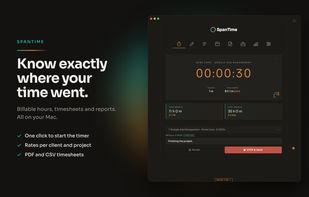
Timer: pick a job, add a note, and start. A quick-entry popup and a menu bar icon let you start and stop without opening the main window.
Log: every entry you have tracked, with filters for date, client and tag, plus free text search. Undo and redo are always labelled.
Week: your current week day by day, with the billable split per day and a weekly goal.
Summary: totals per client and project with your rates already applied, ready to invoice.
Stats: billable versus non-billable, earnings by month, hours by weekday, and budget status.
Manage: clients, services, jobs and tags, including a budget per job with alerts before you overrun.
Rates: set one default rate, or a rate per client or per service. Round durations to match how you invoice, and mark internal work as non-billable.
Settings: light and dark themes, rounding rules, currency, weekly goal, interface zoom, and an optional folder sync that writes a backup to a folder you choose yourself, such as one inside iCloud Drive, OneDrive or Dropbox.
25 languages are built in, following your system language with a manual override.







 Stoeffel-Media added SpanTime as alternative to Toggl Track, Clockify and timeBuzzer


 Stoeffel-Media


No comments or reviews, maybe you want to be first?