snapCAD icon
snapCAD icon

snapCAD

Open, edit, and save DWG and DXF files directly in your browser. Familiar CAD commands, real file fidelity, no desktop install.
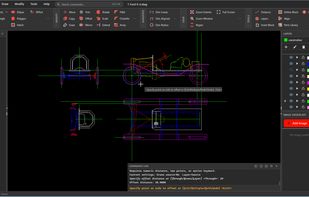
Editing a 1920s Ford Model T chassis drawing — multiple layers (chassis, body, drivetrain, seats), OFFSET command active. SnapCAD opens real-world DWG files with full layer fidelity.

Cost / License

  • Freemium (Subscription)
  • Proprietary

Platforms

  • Online  Requires a modern browser with WebAssembly support (Chrome 90+, Firefox 90+, Safari 15+, Edge 90+)
  • Software as a Service (SaaS)
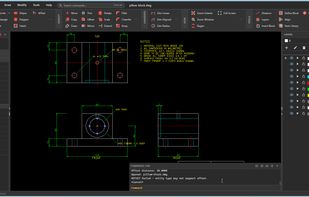
Three-view engineering drawing of a cast iron pillow block — top, front, and right elevations with dimensions, notes, and centre lines. Native DWG, opened in a browser tab.
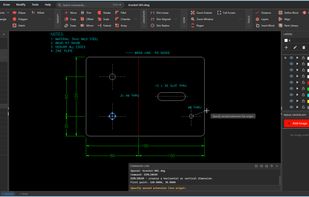
Fabrication drawing for a 3mm mild steel bracket — dimensions, hole callouts, bend lines, and material notes. Selected circle's properties shown in real time.
0likes
0comments
0alternatives
0articles

Features

Properties

  1.  Privacy focused
  2.  Lightweight

Features

  1.  Ad-free
  2.  Browser-based
  3.  No installation
  4.  Web-Based

snapCAD News & Activities

Highlights All activities

Recent activities

snapCAD information

  • Developed by

    AU flagSnapCAD
  • Licensing

    Proprietary and Freemium product.
  • Pricing

    Subscription that costs $12 per month + free version with limited functionality.
  • Alternatives

    0 alternatives listed
  • Supported Languages

    • English
snapCAD was added to AlternativeTo by Peter on and this page was last updated .
No comments or reviews, maybe you want to be first?

What is snapCAD?

SnapCAD is browser-based 2D CAD software for opening, editing, and saving DWG and DXF files without installing desktop software. It runs entirely in your browser using WebAssembly, so your drawings are processed locally — nothing is uploaded to a server during the normal drafting workflow. It's built for practical 2D drafting, not BIM or full 3D parametric modelling. If you're a fabricator sending DXFs to a plasma cutter, a drafting contractor producing plans for clients, a cabinetmaker laying out cut sheets, or a student learning CAD, SnapCAD gives you a familiar command-driven workflow (LINE, PLINE, TRIM, FILLET, OFFSET, HATCH, DIM, LAYER, BLOCK) — in a browser tab, with no install and no annual subscription. Key features: native DWG and DXF read/write (R13 through 2018), full layer management, entity snap (endpoint, midpoint, centre, intersection, perpendicular, tangent), keyboard shortcuts and command aliases, and fabrication-ready DXF export. Files open correctly in AutoCAD, BricsCAD, DraftSight, and any other DWG-compatible software. Free to try — open and edit DWG/DXF files in your browser, no account required. Standard plan at US$12 / €11 / A$19 per month adds save and export. Made in Melbourne, Australia.