
SmartPic icon
SmartPic icon

SmartPic

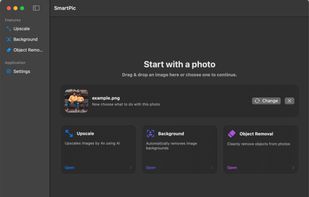
SmartPic helps you remove backgrounds, erase unwanted objects, and upscale images 4×. Designed for macOS workflows: drag & drop, batch processing, and Finder services.
SmartPic screenshot 1

Cost / License

  • Pay once
  • Proprietary

Platforms

  • Mac
0likes
0comments
0articles

Features

Properties

  1.  AI-Powered

Features

  1.  Ad-free
  2.  Remove Image Background
  3.  No registration required
  4.  Dark Mode
  5.  Support for Keyboard Shortcuts
  6.  Remove Unwanted Objects
  7.  Batch processing
  8.  Image Upscaling
  9. Finder icon  Apple Finder Integration

SmartPic News & Activities

Highlights All activities

Recent activities

SmartPic information

  • Licensing

    Proprietary and Commercial product.
  • Pricing

    One time purchase (perpetual license) that costs $8.
  • Alternatives

    50 alternatives listed
  • Badge

    Get an embeddable badge for SmartPic
  • Supported Languages

    • English

AlternativeTo Categories

Photos & GraphicsAI Tools & Services

Popular alternatives

View all
SmartPic was added to AlternativeTo by Paul on and this page was last updated .
No comments or reviews, maybe you want to be first?

What is SmartPic?

SmartPic helps you remove backgrounds, erase unwanted objects, and upscale images 4×. Designed for macOS workflows: drag & drop, batch processing, and Finder services.

  • Background Remover: Automatically isolates the subject and exports a clean PNG with transparency.
  • 4× Upscaler: Upscales images by 4× using AI — sharper edges, more readable details.
  • Object Remover: Mask an unwanted object with a brush and SmartPic fills it in naturally.
  • Contextual Menu Integrated: Run SmartPic tools directly from Finder: right-click an image to Upscale or Remove Background. Fast workflow, no extra steps.

Built for real photo tasks

  • Background removal: Automatically isolate the subject and export with transparency.
  • Object removal: Brush a mask and cleanly inpaint the area you want gone.
  • 4× upscaling: Upscale photos with AI and keep details crisp.
  • Batch processing: Select multiple images and process them in one run.
  • Finder services: Right-click images in Finder to upscale or remove backgrounds.
  • PNG transparency: Preserves alpha when input is PNG; JPEG outputs get a clean white base.
  • Simple outputs: Exports naming like _nobg and _upscaled to keep files organized.
  • macOS-native UX: Keyboard shortcuts, panels, and system-consistent controls.