
SMAC icon
 SMAC icon

SMAC

Local Windows adapter for AI-assisted C# or VB.NET development that keeps the master project under your control. Pack files and feature instructions for any AI chat, then preview proposed inserts, replacements, and appends before accepting, saving, or rolling back changes.
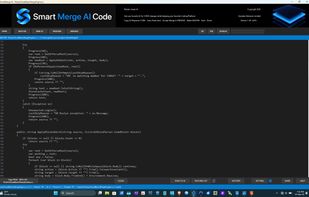
Dark Theme. 
Upper bar showing the OPEN and 4 main loop buttons. MASTER, NEW AI (code), PREVIEW, MERGED and additionally the Search .

Cost / License

  • Freemium (Pay once)
  • Proprietary

Platforms

  • Windows
0likes
0articles
Save

Features

Properties

  1.  Privacy focused
  2.  AI-Powered

Features

  1.  Ad-free
  2.  Dark Mode
  3.  No registration required
  4.  Works Offline
  5.  File Versioning
  6.  No Tracking
  7.  Syntax Highlighting
  8.  Automated code review

SMAC News & Activities

Highlights All activities

Recent activities

SMAC information

  • Developed by

    CY flagGorsetas Ventures Limited
  • Licensing

    Proprietary and Freemium product.
  • Pricing

    One time purchase (perpetual license) ranging between $99 and $139 + free version with limited functionality.
  • Alternatives

    7 alternatives listed
  • Badge

    Get an embeddable badge for SMAC
  • Supported Languages

    • English

AlternativeTo Category

Development
SMAC was added to AlternativeTo by software_gorsetas on and this page was last updated .

No comments or reviews, maybe you want to be first?

Official Links

What is SMAC?

SMAC (Smart Merge AI Code) is a local Windows adapter between any AI chat and any IDE. You keep your editor. You keep your model. SMAC sits in the middle.

SAFE & FAST way to create applications and modify your Master Code. Works with Any AI - Any IDE - Any AI Chat.

ADAPTER - GATEKEEPER - FIREWALL

You get a clear, EASY & EFFICIENT application BUILDING PROCESS.

Typical AI-to-IDE copy-paste damages a live project: a second constructor appears, a method lands after the closing brace, the model forgets features or invents new controls, the designer is edited at the wrong spot, etc.

SMAC exists so that does not become the master. Avoiding many mistakes while building or altering projects.

The loop is short:

  • Open the master.
  • Pack the Feature List and the files you need, then paste that brief into any AI chat.
  • Copy the answer.
  • SMAC can auto-paste the pack onto the NEW AI page.
  • Preview shows what will change, including skipped blocks and Feature List misses.
  • Accept one change or accept all. MERGED stays in memory until you save.
  • Save and restart the modified app in your IDE. Where it always stays.

History can walk a merge back, by build, file, and date.

Four pages: MASTER, NEW AI, PREVIEW, MERGED. Allowed actions: replace, insert after, insert before, append to class. Included Feature List (FL) Manager and Pack to AI Assistant to conveniently hand over files and FL to the chat via one click only.

Everything is designed with the idea

SMAC does not replace Visual Studio, Cursor, ChatGPT, Grok, or Claude. It is the desk between them. The project stays on your PC. Disk changes happen only after you promote and save. Windows 7 till 11. Optimized for C# and available now. VB.NET edition coming soon.

