

Slim My Movies icon
Slim My Movies icon

Slim My Movies

 Like

Windows utility for slimming MKV and MP4 movie files by removing unwanted audio, subtitle, chapter or attachment tracks without re-encoding video. Edit one file or scan a collection, apply saved language rules, add tracks, adjust metadata and delays, and export to MKV or MP4.
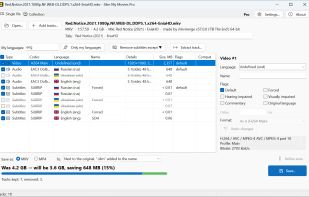
Slim My Movies screenshot 1

Cost / License

  • Freemium (Pay once)
  • Proprietary

Application type

Since

  • New

Platforms

  • Windows
0likes
0articles
Save

Features

Properties

Features

Highlights All activities

Slim My Movies News & Activities

Recent activities

Slim My Movies information

  • Developed by

    RU flagBolide Software
  • Licensing

    Proprietary and Freemium product.
  • Pricing

    One time purchase (perpetual license) that costs $20 + free version with limited functionality.
  • Alternatives

    5 alternatives listed
  • Badge

    Get an embeddable badge for Slim My Movies
  • Supported Languages

    • English
    • French
    • German
    • Spanish
    • Russian

AlternativeTo Category

Video & Movies
Slim My Movies was added to AlternativeTo by collector9 on and this page was last updated .

No comments or reviews, maybe you want to be first?

What is Slim My Movies?

Slim My Movies is a Windows track editor for MKV and MP4 files. It removes unneeded audio and subtitle tracks to reduce file size without re-encoding video. Collection mode scans folders, estimates removable tracks and space savings, and applies saved rules or presets for batch processing. Rules can retain selected languages, original audio, forced subtitles, untagged tracks, and commentary.

Single File mode lists video, audio, subtitle, chapter, and attachment tracks. It can remove or reorder tracks, add external audio or subtitle files or tracks from another release, and edit language, name, default, and forced flags. Audio and subtitle delays can also be adjusted. Output supports MKV and MP4; text subtitles are converted for MP4 output, and unsupported codecs are flagged.

The application rebuilds the container without re-encoding video. Results are checked before replacing files, and originals are retained by default. Single-file editing and collection analysis are free, while batch processing in the free version is limited to five files per day.