A free, open-source audio tagger for macOS that also converts, rips and burns CDs and splits long recordings into tracks. One track list is shared by Tag, Convert and Rip — rip a CD, tag what came out, convert it, without importing anything twice.
Tag
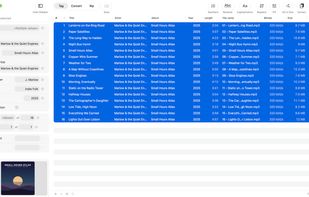
Edit one track or a whole album at once: fields that differ show <Multiple values>, and a field is only written if you actually touched it, so nothing is ever overwritten with an empty value by accident. Batch tools for numbering, capitalization, find and replace (plain text or regular expressions), filling a field from other tags or the file name, renaming files from tags and reading tags out of file names — every step with a preview. Cover art with picture types, scaled per picture when added. Look Up Album finds the release on MusicBrainz (no account needed) or Discogs and lays its tracks next to your files, with each file's length against the release's, so a wrong edition shows before anything is taken over. Undo the last save, add tracks to the Music app.
Convert
MP3, AAC, ALAC, FLAC, Opus, Vorbis, WAV and AIFF via ffmpeg. Sleeve reads the tags first and writes them back itself afterwards, cover included — the album artist and the disc number survive the trip.
Rip, image, burn, copy
Reads audio CDs directly in burst or secure mode, with read offset, C2 error pointers, an optional second pass and a log. CD-TEXT, ISRC and the MusicBrainz disc ID fill in the tags. Writes a gapless image of the whole disc (BIN, WAV or FLAC plus cue sheet), burns images back to CD with a test run first, and copies a CD 1:1 with one button — with one drive it ejects the original and asks for a blank, with two it reads in one and burns in the other.
Split into tracks
Cuts an album video, a vinyl side or a live set into tracks without re-encoding. Silence detection finds the boundaries, two magnifiers set them exactly, and the titles come from MusicBrainz, Discogs or a track list pasted from the video description.
English, German and Spanish, light and dark mode. ffmpeg is never bundled — Sleeve finds the copy on your Mac. No account, no tracking, no App Store.





 EU
EU


 Neon Rost added Sleeve by NeonRost as alternative to Mp3tag, Tagr, MusicBrainz Picard, Kid3 and 2 more
 NeonRost


No comments or reviews, maybe you want to be first?