Skej: Auto Silent Scheduler icon

Skej: Auto Silent Scheduler

 1 like

Skej puts your Android phone on silent, vibrate or full volume by itself, by time, calendar, place or Bluetooth. Set it once.
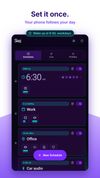
The schedule list
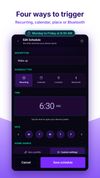
Four ways to trigger: recurring, calendar, place or Bluetooth
+2
What a schedule can change: sound, screen and more

Cost / License

  • Pay once or Subscription
  • Proprietary

Since

  • New

Platforms

  • Android  Requires Android 13 or later
1like
0articles
Save

Features

Properties

Features

Highlights All activities

Skej: Auto Silent Scheduler News & Activities

Recent activities

Skej: Auto Silent Scheduler information

AlternativeTo Category

Audio & Music
Skej: Auto Silent Scheduler was added to AlternativeTo by Kelly-Vernon on and this page was last updated .

No comments or reviews, maybe you want to be first?

Official Links

What is Skej: Auto Silent Scheduler?

Skej changes your phone's sound and screen settings on its own. Pick when: at set hours on set days, during calendar events, when you arrive somewhere, or when your car or earbuds connect. Pick what: ringer and volumes, vibrate, Do Not Disturb, ringtones, brightness, screen timeout and more. Save it, and your phone keeps up from then on.

It's for people who want their phone to go silent in meetings and back on afterwards, without building an automation in Tasker or MacroDroid. One form per schedule, no scripting.

Tasker, MacroDroid and Automate can automate almost anything, but you build each automation yourself from triggers, conditions and actions. Skej does one job, your phone's sound and screen settings on a schedule, and asks for nothing more than when and what. Samsung Modes and Routines does some of this, but only on Samsung phones; Skej runs on any Android 13+ phone.

No account, no ads, and your schedules stay on your phone. Android 13 and up. Free for 14 days, no card needed.

Skej: Auto Silent Scheduler Videos