

Simple Audio Manager icon

Simple Audio Manager

 Like

Gives fixed-volume outputs (S/PDIF, HDMI, DisplayPort) a working native macOS volume control, and lets you rename, re-icon and hide audio devices.
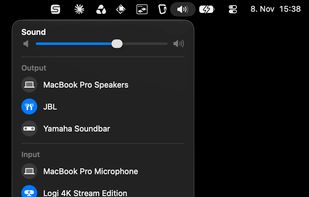
Enhance known MacOS volume control UI

Cost / License

  • Free
  • Open Source (MIT)

Application type

Since

  • New

Updated

  • Updated Nov 2026

Platforms

  • Mac  Requires macOS 15 or later
0likes
0articles
Save

Features

Properties

Features

Highlights All activities

Simple Audio Manager News & Activities

Recent activities

Simple Audio Manager information

AlternativeTo Category

Audio & Music

GitHub repository

  •  0 Stars
  •  0 Forks
  •  0 Open Issues
  •   Updated  
View on GitHub
Simple Audio Manager was added to AlternativeTo by codejo on and this page was last updated .

No comments or reviews, maybe you want to be first?

What is Simple Audio Manager?

Simple Audio Manager gives fixed-volume outputs on macOS (S/PDIF, HDMI, DisplayPort, USB SPDIF adapters) a working native volume control.

A small Core Audio driver publishes a proxy output device with real volume and mute controls, so Apple's volume keys, the on-screen volume indicator and the Control Center slider work unchanged. Audio is forwarded to the physical device inside Core Audio itself: no loopback input, no microphone permission, no orange mic indicator, and audio keeps working when the app is not running.

Features:

  • Native volume and mute for outputs without hardware volume control
  • Rename audio devices and give them custom icons
  • Hide devices you never use from the output picker
  • Optional menu bar Sound picker styled like Control Center's Sound module
  • Automatic switch to the proxy or a fallback device if a hidden device gets selected
  • Command line tool (samctl) for listing devices and managing proxies
  • Universal build for Apple Silicon and Intel

Requires macOS 15 or later. Free and open source under the MIT license.
