




SculptView
10 likes
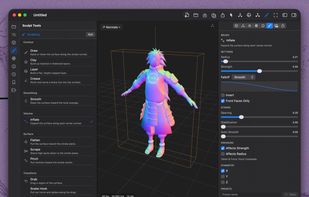
Free, open-source macOS 3D viewer and sculpting tool supporting OBJ, STL, USD/USDZ, and PLY, with high-performance Metal rendering, multiple view modes, twelve pressure-sensitive brushes, symmetry, autosave, export, outliner, VoiceOver, and native SwiftUI interface.

Platforms
- Mac



Features
Highlights All activities
SculptView News & Activities
Recent activities
 recp added SculptView as alternative to AssetLook
- Nam Pham liked SculptView
- mehdi_mifa1986 liked SculptView
- joshuabrush21 liked SculptView
- Viktor Korobov liked SculptView
- Tobias-p liked SculptView
- sebastiane liked SculptView
- cel liked SculptView

Developed by
 zeelsheladiya
 Licensing
Open Source (MIT) and Free product.Written in
Alternatives
10 alternatives listedBadge
Get an embeddable badge for SculptViewSupported Languages

AlternativeTo Category
Photos & GraphicsGitHub repository
- 9 Stars
- 1 Forks
- 1 Open Issues
- Updated


No comments or reviews, maybe you want to be first?