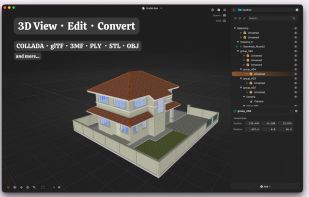
AssetLook is a fast native 3D viewer, scene editor and format converter for Apple platforms. View a complete scene, find objects in its outliner, adjust nodes, cameras, lights and materials, and convert files in one app. One purchase covers Apple platforms, with no subscription. Apple TV and Apple Vision Pro support is on the way.
The outliner keeps the scene hierarchy easy to explore. Find and select nodes, expand nested objects, and show or hide parts of a model while inspecting the scene. Materials, textures, cameras, lights, skinning and animations stay together with their scene structure.
Open glTF, GLB, COLLADA/DAE, OBJ, PLY, STL and 3MF files, along with ZAE, KMZ and ZIP packages containing supported models. COLLADA files preserve their complete scene hierarchy and related resources.
On Mac, edit node transforms, perspective or orthographic cameras, lights and materials directly in the viewer. Adjust camera settings, light properties, textures and PBR inputs before exporting. Convert to glTF, GLB, DAE, OBJ, PLY, STL or 3MF, with format-specific options for triangulation, normals, UVs, vertex colors and texture embedding. PLY exports can bake texture colors into vertex colors. Finder Quick Look previews supported files in place, and Finder actions open or convert files directly.
On iPhone and iPad, open models from Files and iCloud Drive, orbit, pan and zoom with touch controls, explore the outliner, show or hide nodes, and inspect materials, cameras and lighting. Place models on real-world surfaces in augmented reality on compatible devices, then move, scale and rotate them with touch gestures.
Preview lighting, environment, exposure and tone mapping remain separate from the cameras and lights authored in the scene. External textures and buffers are read locally from folders you select. AssetLook processes files on your device, requires no account and has no analytics or data collection.
The interface supports 16 languages: English, Arabic, French, German, Indonesian, Italian, Japanese, Korean, Malay, Portuguese, Simplified Chinese, Spanish, Thai, Traditional Chinese, Turkish and Vietnamese.






 recp added AssetLook as alternative to F3D, Exhibit, Autodesk FBX Review, Online 3D Viewer and 9 more


No comments or reviews, maybe you want to be first?