ScreenVeil icon
ScreenVeil icon

ScreenVeil

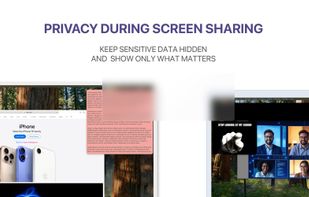
ScreenVeil helps you hide sensitive parts of your screen and place useful overlays on top of any app on macOS. It’s built for screen sharing, presentations, live streams, recordings, and everyday work when you need full control over what stays visible.
ScreenVeil screenshot 1

Cost / License

  • Freemium (Subscription)
  • Proprietary

Platforms

  • Mac  macOS 14.0 or later
1like
0comments
0articles

Features

Properties

  1.  Privacy focused
  2.  Lightweight

Features

  1.  Works Offline
  2.  Ad-free
  3.  Portable
  4.  No registration required
  5.  Dark Mode

ScreenVeil News & Activities

Highlights All activities

Recent activities

ScreenVeil information

  • Developed by

    Egor Griva
  • Licensing

    Proprietary and Freemium product.
  • Pricing

    Subscription ranging between $1 and $8 per month + free version with limited functionality.
  • Alternatives

    3 alternatives listed
  • Supported Languages

    • English
    • French
    • German
    • Russian
    • Spanish
ScreenVeil was added to AlternativeTo by Egor Griva on and this page was last updated .
No comments or reviews, maybe you want to be first?

What is ScreenVeil?

ScreenVeil helps you hide sensitive parts of your screen and place useful overlays on top of any app on macOS. It’s built for screen sharing, presentations, live streams, recordings, and everyday work when you need full control over what stays visible.

With ScreenVeil, you can add floating panels in seconds, adjust their size, position, and transparency, and save complete setups as presets. It’s a simple way to protect private information, keep notes visible, highlight content, or prepare reusable on-screen layouts for meetings and demos.

What you can do with ScreenVeil: • hide sensitive information during screen sharing • place text, images, GIFs, videos, and web content on top of any app • use static panels such as black, blur, glass, and color overlays • save and restore presets for recurring workflows • control panels directly from the menu bar • move all panels across displays • assign keyboard shortcuts for core actions • use it for presentations, teaching, streaming, and productivity

Great for: • meetings and demos • presentations and online teaching • creators and streamers • anyone who wants more privacy and control on Mac

ScreenVeil makes it easy to show only what matters.

Privacy Policy: https://screenveil.netlify.app/privacy Terms of Use (EULA): https://www.apple.com/legal/internet-services/itunes/dev/stdeula/

Official Links