
ScreenshotMenu icon
ScreenshotMenu icon

ScreenshotMenu

ScreenshotMenu is a small menu bar app that puts all of macOS's screenshot modes into one menu, so you don't need to remember keyboard shortcuts.
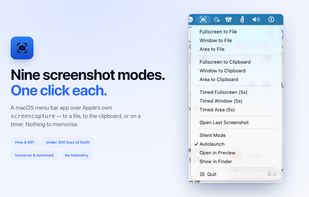
ScreenshotMenu and its nine capture modes in the macOS menu bar

Cost / License

  • Free
  • Open Source (MIT)

Platforms

  • Mac
0likes
0articles
Save

Features

Properties

  1.  Lightweight
  2.  Privacy focused

Features

  1.  Ad-free
  2.  Works Offline
  3.  No registration required
  4.  No Tracking
  5.  Sits in the menu bar

ScreenshotMenu News & Activities

Highlights All activities

Recent activities

ScreenshotMenu information

AlternativeTo Category

Photos & Graphics

GitHub repository

  •  0 Stars
  •  0 Forks
  •  0 Open Issues
  •   Updated  
View on GitHub
ScreenshotMenu was added to AlternativeTo by Ruslan-Malymon on and this page was last updated .

No comments or reviews, maybe you want to be first?

Official Links

What is ScreenshotMenu?

ScreenshotMenu is a small menu bar app that puts all of macOS's screenshot modes into one menu, so you don't need to remember keyboard shortcuts.

Capture modes: fullscreen, a single window or a dragged area, either saved to a file (through a save dialog that opens once the screen is clear) or copied straight to the clipboard, plus timed 5-second captures for menus, tooltips and hover states. Open Last Screenshot reopens the last saved file.

Settings: Silent Mode turns off the shutter sound for screenshots only, Autolaunch starts the app at login, Open in Preview opens each capture for markup, and Show in Finder reveals saved files.

Every menu item runs Apple's built-in screencapture tool, so captures are identical to the system's own. The whole app is one Swift file under 300 lines, with no network code, no analytics and no Accessibility permission; it asks only for Screen Recording, which every capture app needs. Universal binary for Apple Silicon and Intel, signed and notarised, macOS 13 or later. Free and open source under the MIT licence.

It deliberately has no annotation editor, OCR or scrolling capture.

