
Screenify Studio icon

Screenify Studio

Screenify Studio is the Mac screen recorder for indie hackers and technical founders who refuse to pay the editing tax. Turn rough captures into polished product demos without leaving your machine — drive it from the timeline editor, the terminal, or from Claude Code in plain...
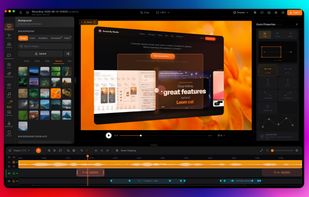
Flexibly customize keyframes to achieve professional camera movement and cinematic zoom.

Cost / License

  • Freemium (Subscription)
  • Proprietary

Platforms

  • Mac
0likes
0comments
0articles

Features

Properties

  1.  Support for Themes
  2.  Privacy focused
  3.  Lightweight

Features

  1.  Hardware Accelerated
  2.  Extensible by Plugins/Extensions
  3.  Dark Mode
  4.  Command line interface
  5.  Annotate Screenshot
  6.  Full-page Screenshot
  7.  Colour Grading
  8.  Support for 4K
  9.  Support for Layers
  10.  Transitions Effects
  11.  Keyframe Animation
  12.  No registration required
  13.  Live Preview
  14.  Upload Screenshot
  15.  AI-Powered
  16.  Screen Recording

Screenify Studio News & Activities

Highlights All activities

Recent activities

Screenify Studio information

  • Licensing

    Proprietary and Freemium product.
  • Pricing

    Subscription ranging between $9 and $89 per month + free version with limited functionality.
  • Alternatives

    14 alternatives listed
  • Supported Languages

    • English
Screenify Studio was added to AlternativeTo by Brjan on and this page was last updated .
No comments or reviews, maybe you want to be first?

What is Screenify Studio?

Screenify Studio is the Mac screen recorder for indie hackers and technical founders who refuse to pay the editing tax. Turn rough captures into polished product demos without leaving your machine — drive it from the timeline editor, the terminal, or from Claude Code in plain English.

Web demos, directed by AI

  • Point it at any URL and it drives a real browser, adds a smooth cursor and auto-zoom on every click, trims dead time, and hands back a finished demo.
  • Or describe the demo in plain language and an AI clicks and scrolls your site for you, then directs cinematic effects — 3D camera tours, spotlights, blur-to-hide, and callout highlights — on the moments that matter. Record pages behind a login; export MP4, GIF, or MOV with one-tap sizing for YouTube, TikTok, and Reels.

3D device stages

  • Drop any recording into a photoreal 3D MacBook, iPhone, or iPad with authentic finishes for each model — the frame follows your zoom and camera moves.
  • A library of environment backdrops and desk surfaces for production-quality framing.

Cinematic camera motions

  • 30+ hand-crafted multi-axis camera moves with real lens controls — focal length compresses the background, aperture blurs it for a soft-backdrop look.

Recording and editing

  • Smart Auto-Zoom follows your cursor and clicks automatically.
  • Cursor Studio: recolorable or glossy 3D cursors, click sound, motion-based tilt.
  • A multi-track timeline that collapses inactive tracks so everything stays selectable.

On-device AI

  • Captions (Whisper), webcam background removal, and silence detection all run on Apple Silicon. Nothing is uploaded.

Automation

  • A JSON-speaking command-line tool records and exports from the terminal, and ships a Claude Code skill so AI agents can record and produce videos in plain English.

Free to start; Pro from $9/mo or $149 lifetime.

Screenify Studio Videos

Show 1 more video

Official Links