ScanChamp is a modern, privacy-focused document scanner for iOS and Android that makes scanning, editing, signing, and organizing documents simple and intuitive.
Built for privacy, designed to work offline. ScanChamp processes documents directly on your device, without automatically uploading them to external servers. Your files stay private and under your control unless you explicitly choose to share them or use an online feature. Core scanning and document editing tools work without an internet connection.
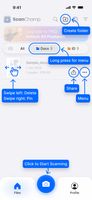
Unlike traditional scanner apps with cluttered menus and complicated workflows, ScanChamp features a clean, modern interface built around intuitive swipe gestures. Its custom-built scanning and image processing system, along with dedicated document filters, helps produce clear, professional-looking scans with minimal effort.
Key features:
— Offline and private: Scan, edit, sign, and manage documents directly on your device without uploading them to the cloud.
— Free without ads: Enjoy essential scanning and document management features without advertising. An optional Pro subscription unlocks additional capabilities.
— Smart document scanning: Automatic edge detection, perspective correction, multi-page scanning, and custom image enhancement filters.
— Intuitive swipe-based interface: A clean, modern experience designed to make working with documents faster and easier.
— PDF editing tools: Rearrange, rotate, merge, and annotate document pages.
— Sign documents: Add signatures directly to scanned documents and PDFs.
— Specialized scanning modes: Dedicated modes for documents, ID cards, passports, books, business cards, and QR codes.
— Document organization: Keep files organized with folders, tags, notes, and search.
— Flexible sharing and export: Export documents as PDF or images, print them, or share them through links and other apps when needed.
ScanChamp combines privacy, offline functionality, a modern user experience, and practical PDF tools in one easy-to-use app for everyday personal, educational, and professional use.









 EU

 icecreamapp added ScanChamp as alternative to CamScanner, iScanner, Adobe Scan, Genius Scan and 12 more

 Icecream Apps Ltd




No comments or reviews, maybe you want to be first?