





SADFinder
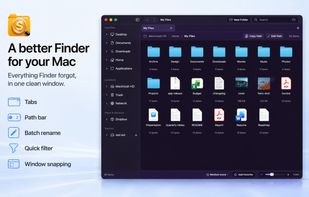
SADFinder is a fast, customizable file manager for Mac. Keep several folders open in tabs, jump anywhere with an editable path bar, filter the current folder, or search filenames and Spotlight-indexed document contents without losing your place.

Cost / License
- Pay once or Subscription
- Proprietary
Application type
 EU
EUPlatforms
- Mac


Features
SADFinder News & Activities
Recent activities
This is a great little tool for anyone coming to Mac from Windows. if you miss windows features, this is the one to get. It's very sleek and fast too.
- Chris Barin updated SADFinder
Ngl I didn't think I needed a Finder replacement until I tried SADFinder. Coming from Windows, Finder always felt a bit off no click-to-enter, backspace didn't go back, stuff like that. This just... fixes it. Tabs, a path bar you can type into, cutting and pasting files actually works like it should. Small things, but they're the ones that were bugging me the most.
- Pash liked SADFinder
I've been looking for a nice file manager for ages, but everything I found looked too old and outdated. This one won the race, it's been a smooth ride for the few weeks I've been using it for.
- Chris Barin updated SADFinder
- James Burns liked SADFinder
SAD Finder really simplifies managing files in mac OS. Its very helpful!
Makes managing files on Mac much easier. The tabs and keyboard shortcuts are really helpful.

What is SADFinder?
SADFinder Videos
SADFinder information
Developed by
 SADFinder
 Licensing
Proprietary and Commercial product.Pricing
One time purchase that costs $49, and / or subscription that costs $5 per month.Alternatives
8 alternatives listedBadge
Get an embeddable badge for SADFinderSupported Languages


Comments and Reviews
This is a great little tool for anyone coming to Mac from Windows. if you miss windows features, this is the one to get. It's very sleek and fast too.
Ngl I didn't think I needed a Finder replacement until I tried SADFinder. Coming from Windows, Finder always felt a bit off no click-to-enter, backspace didn't go back, stuff like that. This just... fixes it. Tabs, a path bar you can type into, cutting and pasting files actually works like it should. Small things, but they're the ones that were bugging me the most.
I've been looking for a nice file manager for ages, but everything I found looked too old and outdated. This one won the race, it's been a smooth ride for the few weeks I've been using it for.
SAD Finder really simplifies managing files in mac OS. Its very helpful!
Makes managing files on Mac much easier. The tabs and keyboard shortcuts are really helpful.
I like how smooth it runs and how you can adjust the style of the Finder. Also the developer reacts to questions with solutions / updates very rapidly!