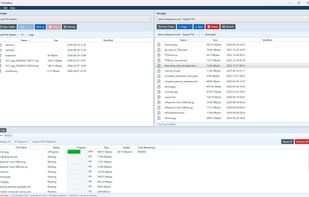
S3Toolbox is a dual-pane file manager for Windows that brings cloud and remote storage into one fast desktop app. Browse, transfer and sync between local folders and AWS S3, S3-compatible object storage, Azure Blob Storage, Google Cloud Storage, FTP, SFTP, SCP and WebDAV, without switching tools.
It’s laid out like a classic Total Commander-style file manager, with two panels side by side so you can copy or move files between any two locations. Every upload, download, copy and delete goes into a transfer queue with live progress, speed and ETA, and you can pause, resume, reorder and limit concurrency.
Key features
Dual-pane browsing across local, S3, SFTP and other remote locations
Transfer queue with progress, speed and ETA, plus pause, resume and reorder
Sync with a full preview of what will be copied, updated or deleted before it runs, in mirror or update mode and checksum-aware
Server-side copies within the same S3 service, so data never passes through your machine
Streamed transfers between different locations, with nothing written to your local disk
Upload and download speed limits and a cap on parallel transfers, so large syncs don’t saturate your connection
Light and dark themes
Pricing: S3Toolbox is a one-time purchase starting at $39, with no subscription and volume discounts for teams. A free trial is available with no account or credit card needed.
S3Toolbox is a good alternative to other S3 clients and file transfer tools if you want one Windows app for several storage providers, with a transfer queue and a sync preview you can check before committing.







 Fenwoks Limited



No comments or reviews, maybe you want to be first?